


It's 11 p.m., and a homeowner has water spreading across the kitchen floor. They type “emergency plumber near me,” tap an ad, and call. Your truck could handle that job, but whether you get it depends on more than where your ad appears. Someone has to answer, confirm the service area, and book the visit.
That's the test of plumber PPC. Not how many people clicked, but how many profitable jobs reached your schedule.
Table of Contents
- What Plumber PPC Is and Why Plumbers Use It
- Bidding, Budgets and What Clicks Really Cost
- Campaign Types and Ad Formats Compared
- Keyword and Location Targeting That Finds Paying Jobs
- Ad Copy and Landing Pages That Turn Clicks Into Calls
- Tracking Calls and Measuring Profit per Job
- Fix Missed Calls and Weak Booking First
- Decide Whether to Hire a Plumber PPC Agency
What Plumber PPC Is and Why Plumbers Use It
Plumber PPC means pay-per-click advertising for plumbing services. With standard search ads, you pay when someone clicks your ad, whether they book a job or leave without contacting you. Your business can appear near the top of a search results page, but placement isn't guaranteed.
Think of it as renting a billboard on the exact corner where people are standing with a plumbing problem. You don't pay everyone who walks past. You pay when someone takes the next step toward your business.
The homeowner's side of that experience looks like this.

How a search becomes an opportunity
Setting up a basic search campaign involves a few connected decisions:
- Choose keywords. Select searches that describe services you sell, such as drain cleaning or water heater repair.
- Set spending limits. Choose a daily budget and a bidding approach, including a maximum click bid where appropriate.
- Write the ad. Tell the homeowner what you do, where you work, and how to contact you.
- Enter the auction. Google evaluates eligible ads whenever someone searches and decides which can appear.
Plumbing suits this model because the need is often urgent, local, and valuable enough to justify paying for the introduction. A homeowner with a leaking water heater isn't necessarily looking for an educational article. They may be ready to hire.
A click isn't the same as a customer
Say a hypothetical $12 click leads to a $350 drain repair. That could be a good trade, provided the repair leaves enough margin after labor, materials, travel, and advertising. The same click reaching a voicemail nobody returns produces no such return.
SEO builds unpaid search visibility gradually. PPC can start showing ads within a day of launch if approval and setup are complete, although a fast launch doesn't guarantee immediate bookings.
Practical rule: Buy access to customers you can serve, not just traffic you can afford.
Campaign choice, targeting, bidding, tracking, and management all need to support that rule.
Bidding, Budgets and What Clicks Really Cost
Most local service businesses start between $1,500 and $5,000 per month in ad spend. That's the advertising budget, not necessarily the total cost of management, landing pages, or tracking software.
For rough planning, divide the monthly amount by 30 to get a daily starting point. Treat that as a planning shortcut rather than a promise that Google will spend the same amount every day.
Use benchmarks as a check, not a quote
PipelineOn's plumbing advertising report lists a $10.49 average CPC, a 4.97% click-through rate, a 7.63% conversion rate, and a $129.02 cost per lead for plumbing campaigns in 2026; it also cites another $8.45 average plumbing CPC benchmark and a $183 average non-branded CPL across 524 contractors with $14.6 million in tracked spend.
Those figures combine different benchmarks and campaign types. They're directional, not a price list for your town.
CPC is what you pay for a click. Cost per lead, or CPL, is ad spend divided by recorded inquiries. Neither tells you whether the work was profitable, and different advertisers may count different actions as leads.
For a hypothetical example, suppose you pay $129 per lead and book one job from every four leads. Your advertising cost per booked job is about $516. That may work for a profitable replacement, but it could be unsustainable for a small repair.
Before setting a budget, write down your average gross profit by service and how often qualified inquiries become booked work. Our explanation of average cost per click can help you understand the auction cost, but your own booking and margin records determine what you can afford.
Bid strategies and when each one fits
| Bid strategy | Works best when | What it needs first |
|---|---|---|
| Maximize clicks | A new account is collecting data | A daily budget and basic click tracking |
| Manual CPC | A small account where you want keyword-level control | Time to review the search terms report each week |
| Maximize conversions | Calls and forms are tracked and the account has steady volume | Working call and form tracking |
| Target CPA | Your cost per lead is stable and known from past results | About 30 conversions in 30 days as a planning checkpoint, not a universal eligibility rule |
| Maximize conversion value | Calls and jobs have dollar values | Job values imported from your CRM |
Maximize clicks or Manual CPC can help a new advertiser control early spending while learning which searches matter. Neither should run unattended. Cheap clicks can still come from people who won't hire you.
Conversion-based bidding becomes more useful when your recorded conversions represent worthwhile business outcomes. Don't switch just because the account has accumulated activity.
Keep branded searches, such as your company name, separate from non-branded service searches. Existing customers looking for your phone number can make blended results look inexpensive while hiding what you're paying to attract someone new.
Campaign Types and Ad Formats Compared
Plumbing ad types compared
| Ad type | How you pay | Best use for a plumber | Main drawback |
|---|---|---|---|
| Local Services Ads | Per valid lead, assessed at first contact | Calls and messages from nearby homeowners | Lead prices change by job type and area, and questionable charges need review |
| Standard search ads | Per click | Service-specific and emergency searches such as water heater repair | Emergency terms can be costly and need call and form tracking |
| Call-only ads | Per click | Phone-first emergency work on mobile | No landing page to persuade the visitor, so the phone team must close the job |
| Performance Max | Automated bidding based on conversion goals, not a fixed per-lead price | Reaching Maps, YouTube and Display from one budget | Less control over which searches trigger ads, and it needs clean conversion data |
Understand what triggers a charge
Google's Local Services Ads guidance lists plumbers as an eligible category and explains that businesses pay for valid leads assessed when the potential customer first contacts them. Leads judged invalid or low quality aren't charged, while a charged lead can later receive an automated credit if Google determines it was low quality.
A valid advertising lead still isn't a guaranteed booking. Track Local Services calls and messages separately, review questionable charges, and record what happened after contact.
Standard search ads offer more direct control over keywords, ad text, and landing pages. You pay for the click, then your page and office team have to turn that visit into business.
Call-only ads are designed around starting a phone conversation rather than sending someone to a website. For a phone-first setup, check which call-focused formats are available in your account, including search ads with call assets. Run them only when someone can handle the conversation.
Performance Max spreads a budget across placements including Search, Maps, YouTube, and Display. It can reduce the work of building separate campaigns, but automated bidding doesn't mean you pay only when someone books.
Choose the simplest measurable starting point
A small plumbing shop will often benefit from starting with service-specific search ads and reliable call tracking. Add Local Services Ads if the business qualifies and has the capacity to manage incoming leads.
Performance Max makes more sense once conversion records are clean enough to guide automated decisions. Feeding it every form submission and accidental phone tap can encourage the wrong activity.
Choose the format whose results you can connect to booked work. More placements aren't automatically better if you can't tell which produced useful jobs.
Keyword and Location Targeting That Finds Paying Jobs
Build your account around how you dispatch and earn money. Emergency plumbing, water heater repair, sewer-line service, and drain cleaning shouldn't all sit in one undifferentiated keyword group.
The reason goes beyond tidy reporting. A specific search deserves a specific answer.
Understand Ad Rank before raising bids
Google calls its auction evaluation Ad Rank. Google's Ad Rank guidance explains that bids, ad and landing-page quality, minimum thresholds, competition, location, device, time, query context, and expected asset impact influence the result.
Google recalculates Ad Rank for each auction. It uses the evaluation to decide whether an ad can show and then to determine its position. A higher bid alone doesn't guarantee the placement you want.
Better query-to-ad-to-page alignment can improve eligibility and positioning. Higher-quality ads may also face lower thresholds and lower actual click costs, though neither outcome is guaranteed.
Create separate ad groups for distinct services, with landing pages that answer the corresponding need. Separate geographic campaigns when budgets, coverage, or dispatch arrangements differ. Don't split so finely that every small group becomes difficult to manage.
Choose match types deliberately
- Exact match gives tighter control over search intent, though it isn't limited to identical wording. A starting example is
[emergency plumber]. - Phrase match allows a wider set of related searches while retaining the keyword's meaning. An example is
"24 hour plumber Dallas". - Broad match gives Google more freedom to match related intent. Use it cautiously, with strong exclusions, trustworthy conversion tracking, and suitable automated bidding.
The keyword is what you enter. The search term is what the homeowner typed. Confusing those is how owners miss irrelevant spending.
Use negative keywords to exclude searches you don't want:
- Information seekers: DIY and how to fix.
- Employment searches: plumber salary, jobs hiring, and training.
- Shopping rather than hiring: parts and supply-related terms.
- Poor service fit: free services and plumbing work you don't offer.
Apply negatives carefully. Blocking an entire word can remove useful searches if that word also appears in legitimate customer requests.
Target where your trucks can work
Choose cities, ZIP codes, or a radius that reflects practical travel times. Exclude areas you don't cover, including locations that look nearby on a map but are awkward to reach.
Use presence-based location targeting rather than broadly including people who merely show interest in the area. Check location reports after launch because targeting settings aren't a substitute for reviewing actual results.
Align ad schedules with staffed response hours. If you can't provide overnight service, reducing bids is less protective than pausing those hours.
Review the search terms report weekly. Add exclusions, consider moving useful converting terms into exact match, and evaluate results by service and search term rather than relying on one account-wide average.
Ad Copy and Landing Pages That Turn Clicks Into Calls
A homeowner shouldn't have to work out whether your ad answers their problem. Put the service and city in the headline, then use the description to explain the next step.
Only promise emergency availability, same-day appointments, or rapid arrival when your operation can deliver. A persuasive claim that the dispatcher has to walk back creates a poor start to the job.
Quality Score is a diagnostic, not the auction itself
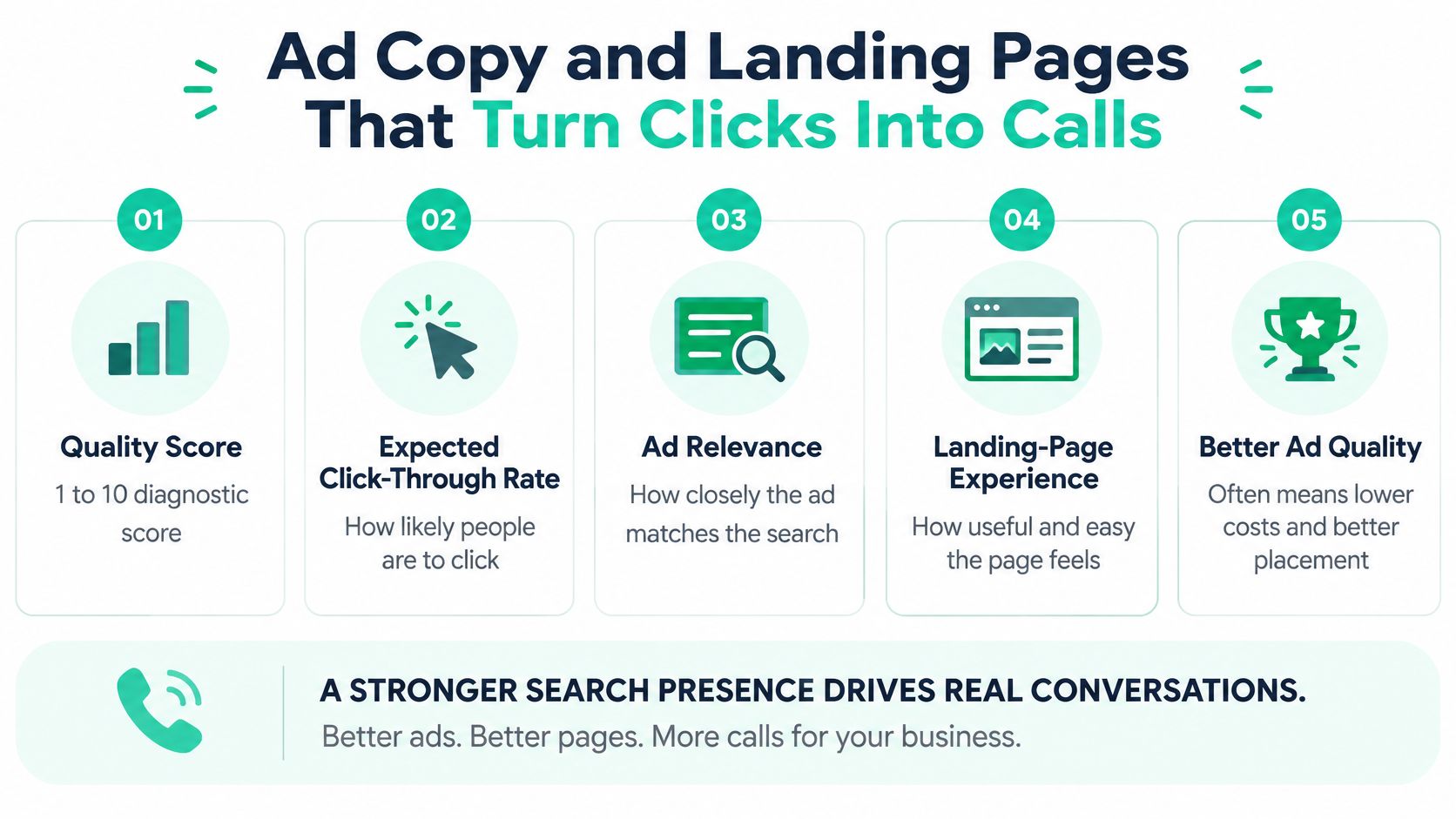
Google's Quality Score explanation describes a 1-to-10 diagnostic based on expected click-through rate, ad relevance, and landing-page experience. The displayed score isn't a direct auction input, although underlying auction-time quality signals influence placement and higher-quality ads can often achieve lower actual CPCs.
Use those components to find weaknesses, not as a score to chase regardless of bookings. An ad can attract plenty of attention while appealing to the wrong customer.
This checklist summarizes how the pieces fit together.
Match the page to the promise
For a search such as “24 hour plumber,” use an emergency-service page rather than a generic homepage. Show the availability, covered locations, and a clear phone button before asking the visitor to browse.
Give each ad group a dedicated page or a clearly matched section where practical. Useful landing-page elements include:
- A matching headline. Confirm the service immediately, such as emergency plumbing in the advertised city.
- An accessible phone number. Put a click-to-call button in the header and test it on a phone.
- Coverage and availability. List service areas and accurate operating hours.
- Verifiable trust details. Include current license and insurance information, genuine reviews, and accurate review counts and ratings.
- Real business photos. Show your technicians and trucks rather than relying entirely on stock images.
- A short booking form. Ask for name, phone, address, and the plumbing problem without demanding unnecessary details.
Avoid placing a large promotional banner above the information a worried homeowner needs. Check loading speed with PageSpeed Insights, and submit the form yourself to confirm the office receives it.
Our guide to common landing-page optimization mistakes provides a useful checklist for removing friction.
Test a specific change, such as the headline or booking form, rather than rebuilding everything at once. Let several weeks of qualified-call and booking records guide the decision, extending the test when volume is sparse. Keep the version that produces better business outcomes, not just more button taps.
Tracking Calls and Measuring Profit per Job
A phone click tells you someone intended to call. It doesn't confirm that anyone answered, the caller needed your services, or the visit happened.
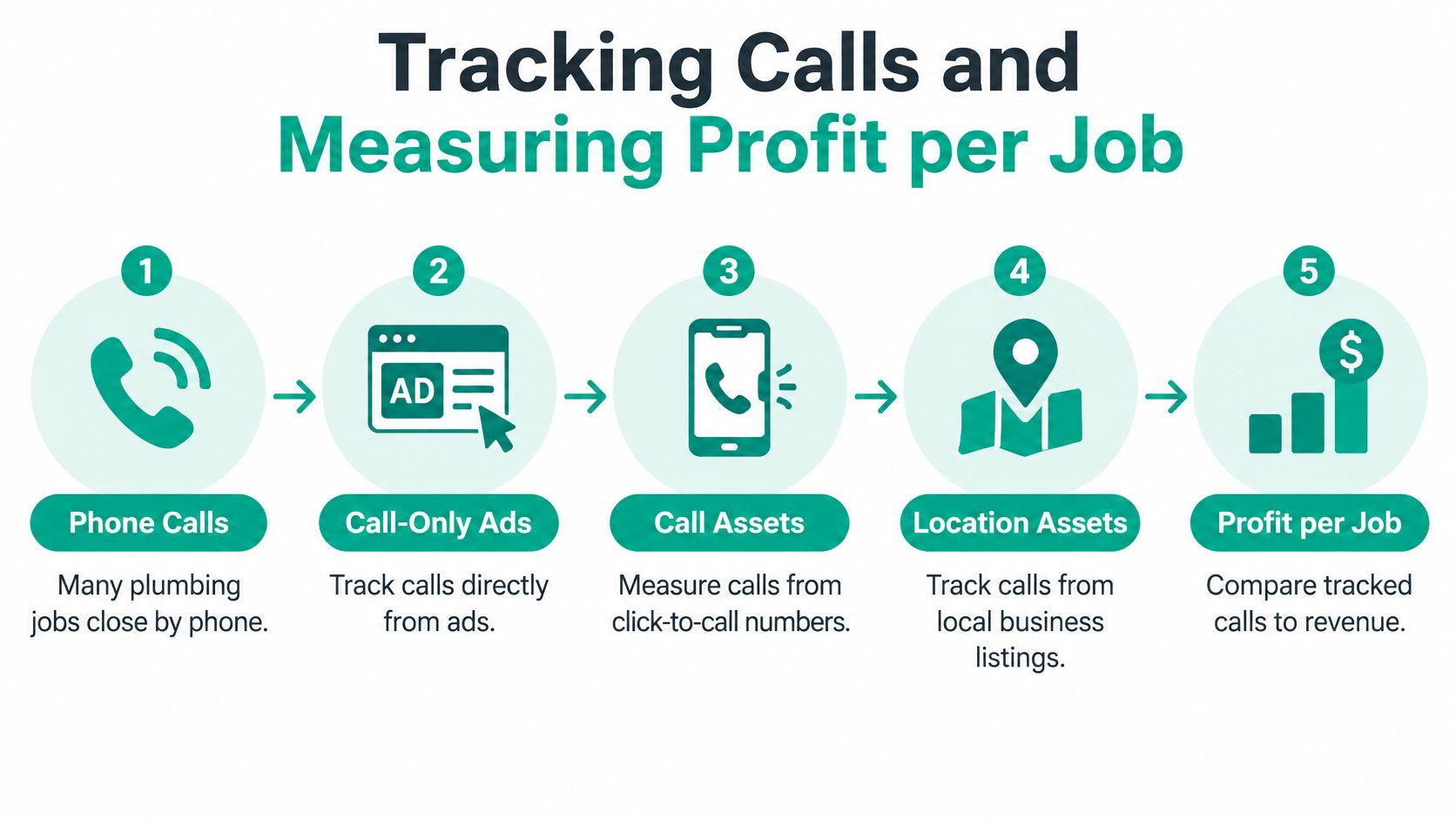
Google's phone-call conversion guidance covers tracking calls from call-only ads, call assets, location assets, and website numbers shown after an ad click, including minimum-duration settings and imported call outcomes. Those imports let you connect advertising activity with business records instead of treating every conversation as equally valuable.
The tracking path should continue beyond the ringing phone.
Set up a usable chain of outcomes
Enable call measurement. Configure eligible ad numbers and dynamic website number replacement. Test both direct ad calls and calls made after a website visit.
Validate the duration threshold. Compare short and long calls with recordings or CRM dispositions. A caller can book an emergency repair quickly, while a long conversation can still be a supplier or sales pitch. Handle recordings with appropriate notices, permissions, and access controls.
Separate conversion actions. Maintain distinct records for answered calls, qualified service calls, booked appointments, and completed jobs. Don't make every stage a primary bidding goal or count the same customer repeatedly as separate wins.
Assign meaningful values. Base values on expected gross profit by service type. A water heater replacement may deserve a higher value than drain cleaning, but use your actual margins rather than assuming the larger invoice is always better.
Import qualified outcomes. Send qualified-call or booked-job records from your CRM into Google Ads weekly, or automate a more frequent feed. Preserve identifiers and timestamps so records match correctly.
At Assertive Agency, we tune bidding to calls and booked jobs rather than clicks. That requires the advertising account and office records to describe the same customer journey.
For a visual walkthrough of call tracking, use the video below.
Read the monthly report like an owner
Calculate advertising cost per booked job by dividing service-level ad spend by booked jobs attributed to that service. Then check completed work, collected revenue, and gross profit, since cancellations and unpaid invoices change the result.
Keep revenue and profit clearly labeled. If you send gross-profit-based conversion values to Google Ads, don't describe the resulting value-to-spend ratio as revenue return on ad spend.
A campaign producing fewer inquiries can be the better campaign if more of those inquiries become profitable completed jobs.
Without outcome imports, automated bidding can favor frequent low-quality calls. Your monthly review should show whether each service leaves money after fulfillment and customer acquisition, not merely whether calls became cheaper.
Fix Missed Calls and Weak Booking First
Once a homeowner clicks, you've already paid for the introduction. If their call goes unanswered and they hire another plumber, changing keywords won't recover that opportunity.
Plumbing SEO Agency's industry roundup cites a 14% missed-call rate for home services, a separate call-analysis summary in which only 61% of callers reached a person, and a 2025 homeowner survey in which 80% considered online booking when choosing a provider. These are separate findings, not interchangeable measurements of the same callers.
Plumber PPC symptoms, causes and fixes
| Symptom | Likely cause | Fix |
|---|---|---|
| Many calls, few booked jobs | Out-of-area searchers or price shoppers | Validate a call-length threshold, check recordings, and exclude out-of-area locations |
| Clicks but almost no calls | Hidden phone number or a page that doesn't match the search | Put a click-to-call button in the header and match the page to the ad group |
| Cost per lead keeps rising | Broad match pulls unrelated DIY and employment searches | Add negative keywords and consider exact match for converting terms |
| Calls go to voicemail after hours | No coverage and no booking option | Pause after-hours advertising or add an answering service and online booking |
| Good leads but slow follow-up | No text-back or callback process | Set up automatic text-back and record time to first response |
A duration threshold improves measurement; it doesn't prevent poor calls. Listen to what happened before deciding whether the advertiser, landing page, or booking team needs attention.
Repair the response path in order
Start by separating emergency demand from scheduled work, such as replacement estimates. Display truthful hours and coverage so homeowners don't mistake an appointment request for immediate dispatch.
Route calls by city and job type to someone authorized to book. Give that person clear service boundaries, available appointment windows, and an escalation contact for uncertain requests.
When nobody can answer, pause the affected advertising hours or use an answering service that can schedule work. Message-taking alone still leaves the homeowner waiting.
Offer online booking and a permission-aware automatic text-back for people who won't wait on the phone. Make clear whether the customer has reserved a confirmed appointment or only requested one.
Each month, review unanswered calls and delayed callbacks. Record confirmed lost opportunities separately from estimated lost revenue, then compare both with advertising spend.
Before increasing spend: Test the entire response path yourself, including what happens when the office is busy.
Raising the budget before that path works can buy more missed calls.
Decide Whether to Hire a Plumber PPC Agency
Hire help when you can't review search terms weekly, maintain tracking, or make careful budget decisions. Spending more than about $3,000 a month is a useful point to consider professional management, not a hard threshold that makes an agency necessary.
Managing a smaller account yourself can work if a dispatcher handles inquiries and you can reserve a few hours each week. If nobody answers during advertised hours, hiring an ad manager alone won't solve the underlying problem.
Plumber PPC agency pricing models
Treat these as rough comparison ranges, not an Assertive Agency quote.
| Pricing model | How it bills | Typical range | Watch for |
|---|---|---|---|
| Flat monthly fee | Fixed amount each month | About $500 to $3,000 per month, according to scope | Scope creep and unclear reporting |
| Percentage of ad spend | Share of advertising spend | About 10% to 20% of spend, often with a minimum | Fees rising with spending without better results |
| Hybrid | Base fee plus a smaller percentage | Base fee plus a lower percentage of spend | Both charges need clear definitions |
| One-time setup | Charged once for tracking and account build | Fixed project quote based on build and integration scope | Whether call tracking and conversion imports are included |
Separate the agency fee from platform spending, software, and page development. A low management fee isn't helpful if essential tracking sits outside the agreement.
Questions that protect your business
Before signing, get clear written answers:
- Account ownership: Does your business own the Google Ads account, with administrator access and the ability to retain it?
- Reporting: Will you see cost per booked job and service-level outcomes rather than only clicks?
- Bidding goals: Will optimization follow qualified calls and booked work?
- Record access: Who controls call recordings, CRM connections, and exports when the relationship ends?
Walk away from guaranteed first-place claims, locked data, or long commitments without a reasonable exit. Require a setup scope that names call tracking and booked-job imports.
For planning, our free Google Ads Budget Calculator estimates monthly clicks, leads, and cost per lead from a chosen budget for HVAC, Plumbing, Roofing, Legal, Dental, and Home Services. Use estimates to compare scenarios, not as promised results.
Review small-business PPC services against your available budget and internal capacity. Choose a partner who can explain how their work supports profitable bookings, and keep new-customer acquisition results distinct from searches for your existing business name.
Assertive Agency offers PPC management, landing-page development, and conversion tracking, along with Local Services Ads setup and lead management for home services under Google Guaranteed. Visit Assertive Agency to discuss a plumber PPC plan built around qualified calls, booked jobs, and the profit those jobs leave behind.
