


“Get your Quality Score as high as possible” sounds like sensible Google Ads advice. But it can send a small business owner toward the wrong goal: a better-looking report instead of more profitable customers.
Google Ad Quality Score is a diagnosis, not a price tag. To use it well, you need to know what Google is comparing, which part of the customer journey needs work, and whether that weakness is costing your business qualified leads.
Table of Contents
- What the 1 to 10 Score Is and Is Not
- How Score Changes Cost per Click
- The Three Ratings Behind the Number
- Myths About Match Types and Ad Assets
- Fixes for Each Below Average Rating
- Decide What to Fix Before You Raise Bids
What the 1 to 10 Score Is and Is Not
Say two HVAC businesses in the USA appear for the same emergency repair search. Business A bids aggressively and pays more per click. Business B pays less, even though both want the same customer.
That difference doesn't tell you which business has the better Quality Score. A bid, a quality diagnosis, and an auction outcome are different things. Confusing them makes it easy to assume that spending more will fix an ad that doesn't match what the customer needs.
A comparison with competing ads
Google's Quality Score guide defines the metric as a diagnostic rating for eligible Search keywords on a 1 to 10 scale, with 1 lowest and 10 highest, comparing performance with other advertisers over the previous 90 days. Google builds the diagnosis from expected click-through rate, ad relevance, and landing-page experience.
Each component gets a status: Above average, Average, or Below average. They don't receive separate numerical grades that you can add together.
The distinction between bids and the diagnostic score matters when comparing competing businesses.
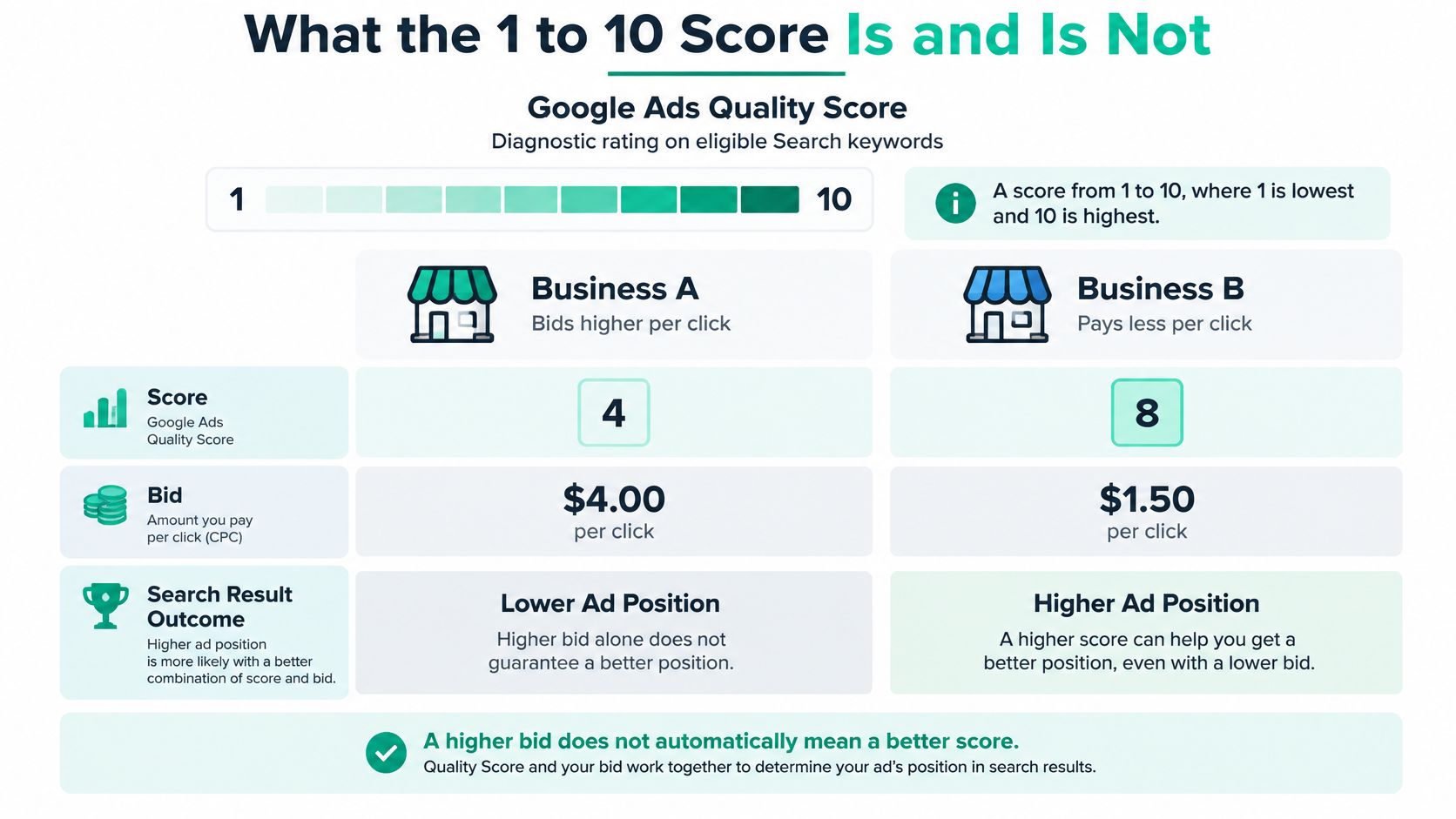
Think of the visible score as a report on how your keyword's ad experience compares with competing experiences for the same search. It isn't a permanent grade attached to the keyword itself.
A strong result means Google's recent comparison looks favorable. It doesn't establish that your offer is ideal for every customer, that your page can't improve, or that the clicks will become profitable jobs.
What happens in the live auction
Google's explanation of auction-time quality makes the critical distinction: the displayed Quality Score isn't directly inserted into the live Ad Rank calculation. Google evaluates quality in the context of the actual search, including the query, device, location, and time of day.
Ad Rank determines whether and where an ad can show. At auction time, Google combines quality assessments with the bid and other factors, rather than treating the stored score as a fixed multiplier.
For the HVAC businesses, that means a customer searching on a phone for urgent help presents a different situation from someone researching replacement systems on a computer. The visible keyword diagnosis doesn't describe every possible auction in equal detail.
Practical rule: Use Quality Score to choose what to investigate, not to predict what your next click will cost.
Keep these responsibilities separate:
- Your bid expresses what you're prepared to spend under your bidding approach.
- Your diagnostic score helps identify weaknesses in predicted clicks, message fit, or the destination.
- Your auction outcome reflects the circumstances of the particular search.
If the billing model is unfamiliar, our guide to PPC advertising explains how paying for clicks fits into campaign planning. For optimization, the useful question isn't whether you can buy a better grade. It's whether your ad and page give the searcher a clearer, more useful path.
How Score Changes Cost per Click
Reported cost and impression gaps by Quality Score
| Comparison | Reported effect | Report year |
|---|---|---|
| Score 7 versus score 5 | About 28% lower CPC, according to Owlclaw's Google Ads benchmarks | 2025 |
| Score 10 versus score 5 | About 50% lower CPC, reported in Owlclaw's statistics and its benchmark comparison above | 2024 and 2025 |
| Scores 7 to 10 versus weaker ads | About 50% more impressions on the same budget, according to Owlclaw's impressions report | 2024 |
| Poor score versus an optimized campaign | About 2 to 3 times the CPC, according to Rocking Web's industry benchmarks | 2025 |
These are third-party reported comparisons, not official Google discounts. Google hasn't published a fixed percentage off for each point on the scale. The comparisons also describe different measures: more impressions on a budget isn't the same thing as cheaper clicks, and neither automatically means more customers.
Higher-quality ads can qualify for lower prices and better positions. But the account-visible score isn't a coupon code you can apply to your next invoice.
Read the gaps as a reason to investigate
Say a keyword has a middling score and consumes a large share of your advertising spend. The table gives you a reason to open its component statuses. It doesn't give you a reliable forecast of what you'll save after rewriting the ad.
Perhaps the ad is relevant, but the page sends visitors through a confusing navigation menu. Perhaps the page works well, but the headline sounds like every competitor's headline. Those are different problems, and they need different tests.
You also can't use the table to compare unrelated markets as though they were identical. A legal search and a local HVAC search bring different competitors, customer needs, and commercial stakes.
A reported relationship between scores and costs doesn't establish a guaranteed discount for your account.
Check the cost of a useful customer action
A cheaper click can still be a bad purchase. If an ad attracts people outside your service area or customers looking for a service you don't provide, a lower CPC won't solve the business problem.
Before changing bids, compare:
- CPC to understand what you're paying for traffic.
- Qualified conversion rate to see whether that traffic becomes relevant inquiries.
- Cost per qualified lead to judge whether those inquiries are affordable.
- Lead outcomes to distinguish booked work from spam, wrong-service calls, and unqualified forms.
Our explanation of average cost per click can help you interpret the traffic cost without mistaking it for customer acquisition cost.
For a service business, define a qualified lead before evaluating the test. That might mean an inquiry from someone in your service area who needs a service you offer. For a retailer, focus on purchases and their economics rather than treating every visit as equally valuable.
Pair the score with cost per qualified lead before changing bids. Otherwise, you could celebrate cheaper traffic while spending more to win each customer.
The Three Ratings Behind the Number
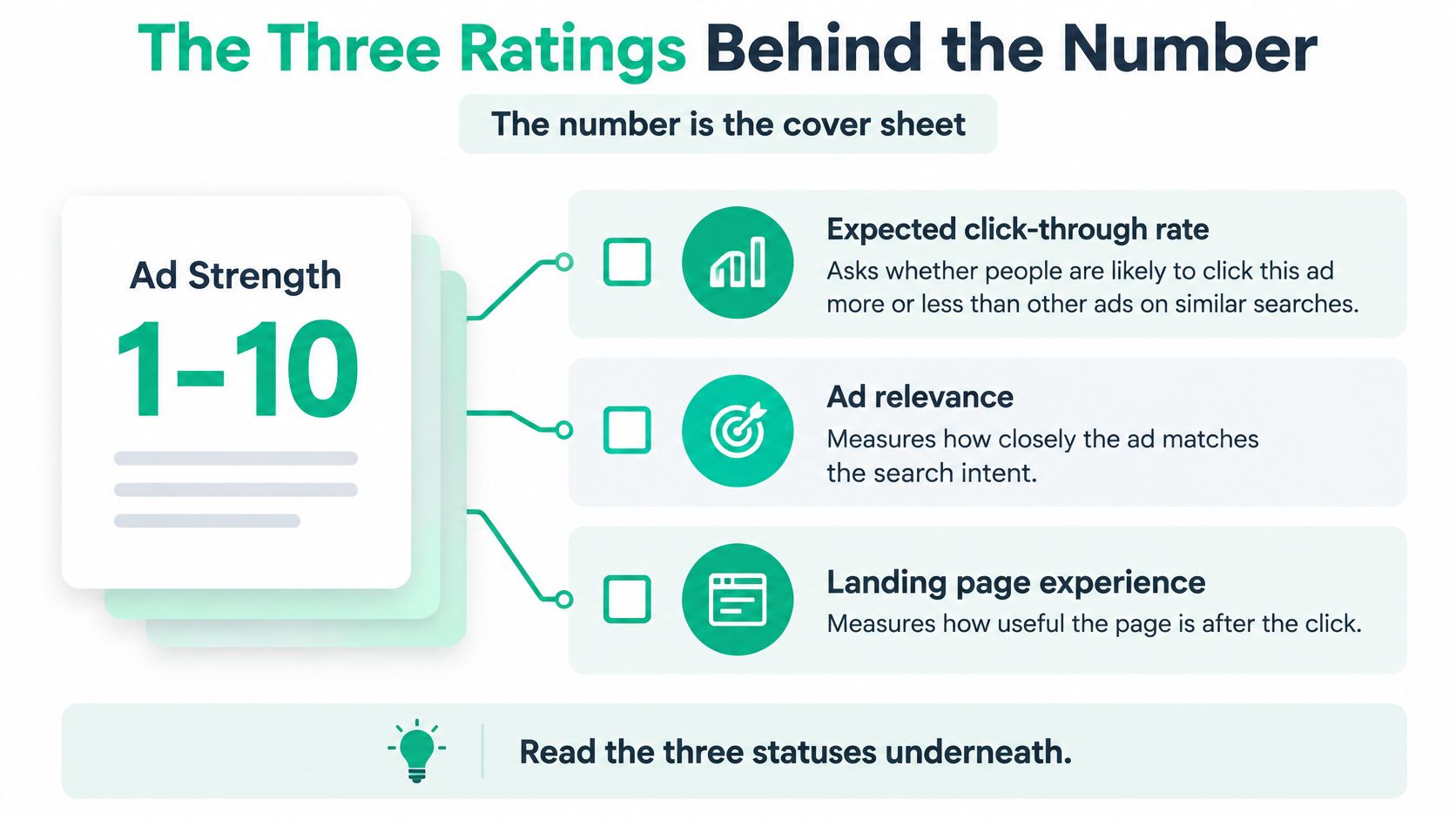
Treat the overall figure as a cover sheet. The useful instructions sit underneath it.
Google's guidance on improving ad quality identifies expected CTR, ad relevance, and landing-page experience as the diagnostic components and recommends considering them alongside conversion rate, site engagement, and business results. A better status isn't proof of better leads.
Use this visual to separate the questions each component asks.
Click appeal and message fit are different
Expected click-through rate asks whether someone is likely to click your ad relative to competing ads for comparable searches. A Below average status suggests that the message may not give the searcher a strong enough reason to choose it.
Say an emergency AC repair business offers same-day appointments but runs an ad that says only “Quality Home Comfort Services.” The business may be relevant, yet the headline doesn't communicate the urgent help the customer wants. Test the actual offer, but only if the business can deliver it.
Ad relevance asks whether the keyword intent and ad describe the same job. A law firm ad group mixing divorce and car accident searches forces a general message onto people with very different needs. More persuasive wording alone won't fix that mismatch.
| Component | Below average usually means | First fix |
|---|---|---|
| Expected CTR | The ad is less likely to be clicked than rival ads on similar searches, after Google adjusts for position and assets | Rewrite the headline so it names the search problem and the offer |
| Ad relevance | The keyword intent and the ad copy don't line up | Split the ad group so each intent gets its own message |
| Landing-page experience | The page doesn't match the ad promise or is hard to use | Repeat the offer above the fold and make the page fast and clear |
The destination must finish the job
Landing-page experience concerns what happens after the click. The visitor should find the promised service or product without having to figure out where you've hidden it.
For example, a retailer advertises a particular product but sends the click to the homepage. The shopper must search again, even though the ad appeared to offer a direct route. Sending that visitor to the matching product page is a more useful starting point than polishing the ad's headline.
Don't confuse Ad Strength, an ad-creation diagnostic, with the expected-CTR component of Quality Score. The component names in your keyword report are the ones to use when diagnosing this metric.
For a video explanation to accompany the component checklist:
After a change, inspect the customer journey as well as the label. Did more relevant visitors contact you? Could they complete the form on a phone? Those answers tell you whether you repaired something useful.
Myths About Match Types and Ad Assets
Changing a keyword from broad match to exact match isn't, by itself, a Quality Score fix. You may change which searches you can reach, but changing the setting doesn't erase the history Google uses for the diagnosis.
Google's explanation of match types and Quality Score says the score relies on historical impressions for exact searches associated with a keyword. It also explains that a broad-match keyword can display a score without its own impressions when a corresponding exact-match keyword received impressions during the previous 90 days.
Assets and higher positions aren't shortcuts
Sitelinks, callouts, and other assets can help customers understand an offer. Add them when they provide useful information, not because you expect them to repair the diagnostic score.
Google's expected-CTR guidance explains that the estimate accounts for position and visibility differences, including formats and assets, and removes the influence of assets when determining that component. An ad at the top naturally has more opportunity to attract clicks, so Google adjusts for that advantage.
That means these actions need separate business reasons:
- Change match type to improve search coverage or control, not to reset a grade.
- Add assets to help people find relevant information or take a useful action.
- Raise bids when the acquisition economics and delivery opportunity justify it, not to make the ad more relevant.
Buying more visibility doesn't repair a vague message.
There isn't a universal good-score cutoff
Google's keyword diagnostic guidance confirms that there's no campaign-, ad-group-, or account-level Quality Score. An average calculated in a spreadsheet is your reporting summary, not a separate Google metric.
The same caution applies to a blanket rule such as “8 or higher is good.” A local HVAC advertiser, an online store, and a law firm face different competitors on different searches.
Seasonality, a changing search mix, new keywords, limited impressions, and different rivals are reasons to investigate a movement rather than immediately blame the creative. Check whether the same component weakens across a meaningful group of related keywords.
A scattered change calls for a different response from a consistent landing-page problem across an entire service category. Look for a pattern you can explain before making a structural change.
Fixes for Each Below Average Rating
Start in the Keywords view in Google Ads. Open the column controls and add Quality Score, Expected CTR, Ad relevance, and Landing page experience, along with spend, impressions, conversions, and cost per conversion.
Export the table before editing anything. That gives you a baseline and prevents you from relying on memory when results change.
Use the workflow below to organize the work, while keeping high-spend keywords with no conversions on your investigation list.
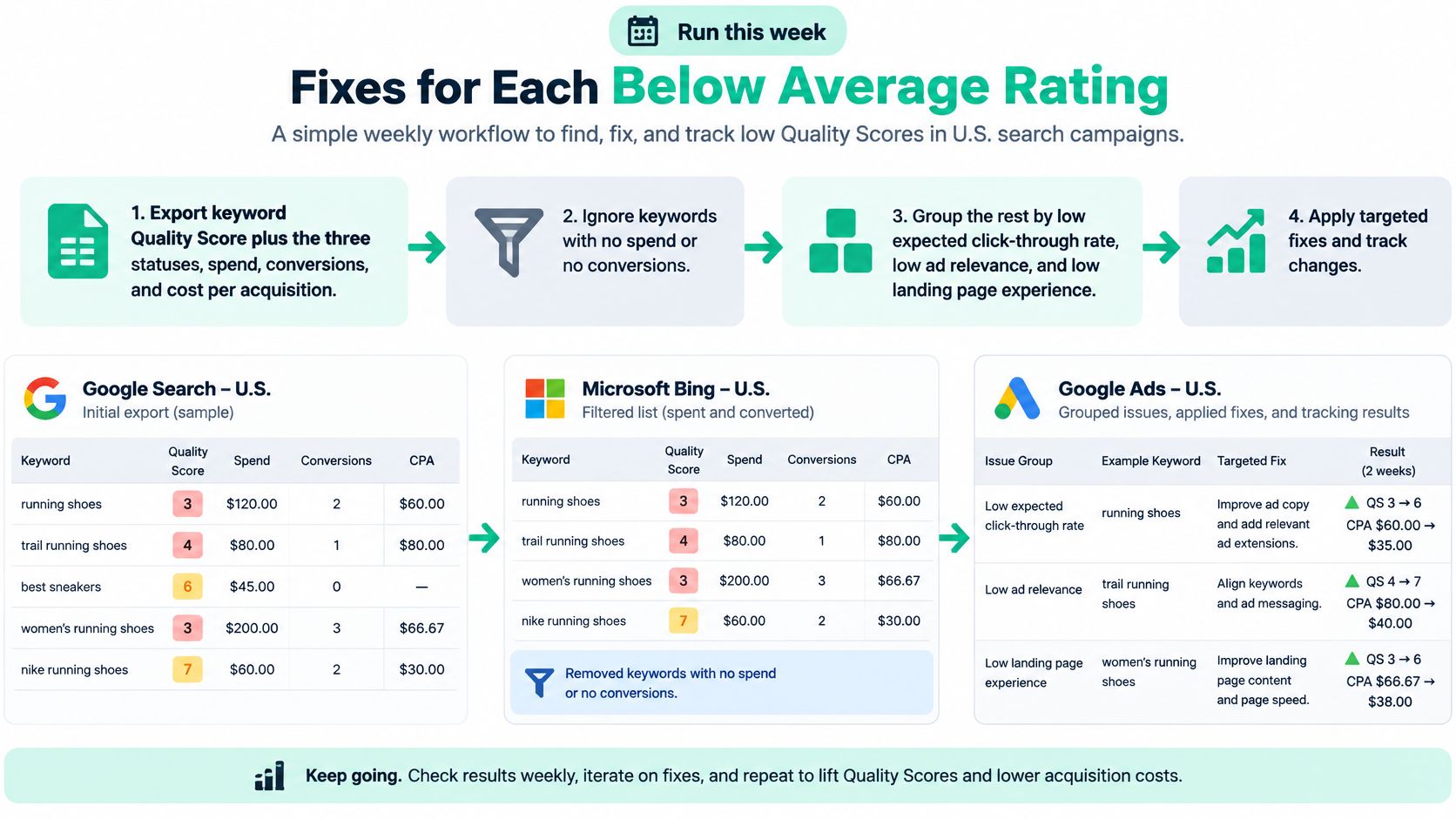
Build a worklist before rewriting ads
Save the baseline. Export keyword scores, component statuses, spend, conversions, and acquisition cost. Add qualified-lead outcomes from your CRM or call review where available.
Set low-information keywords aside. Don't make a confident diagnosis from almost no impressions. Keep monitoring them, but prioritize keywords with enough activity to reveal a usable pattern.
Sort by spend. Pull out expensive keywords with Below average ad relevance or landing-page experience. Don't discard a keyword merely because it has no conversions. Spending without results can make it especially important to inspect.
Separate search intent. Group keywords by what the customer needs, not just by shared words. Repair, maintenance, and replacement may require different offers and destinations.
Match the fix to the weak component. For expected CTR, test a clearer problem-and-offer headline. For relevance, repair the keyword-to-ad relationship. For landing-page experience, repair the destination.
Check the complete path on a phone. Read the ad, open the page, and try the next action. Confirm that the offer is visible, the page loads cleanly, and the contact method works.
Record the change and evaluate business results. Allow enough fresh activity to make a useful comparison. Judge qualified conversion rate and cost per acquisition rather than requiring the displayed score to rise.
Apply the relevant fix to each search
For emergency AC repair, keep urgent repair intent separate from tune-ups and installations. If same-day repair is genuinely available, make that offer clear in the ad and on the repair page. Don't promise availability the scheduling team can't support.
For car accident legal help, separate the ad group from family law. Use language that matches the case type and send the visitor to the corresponding practice-area page. A broad law firm homepage makes the visitor do unnecessary sorting.
For a specific retail product, use the matching product page. Put the product name, price, availability, and purchase action where the shopper can find them immediately. Remove clutter and investigate slow templates instead of adding more promotional copy around the problem.
Our guide to common landing-page optimization mistakes can help you inspect that destination more systematically.
Testing discipline: Change the part you suspect is broken, record what you changed, and check whether the resulting customers are worth acquiring.
A lower diagnostic score can still accompany profitable results. Google's explanation of Quality Score positions it as a diagnostic aid, not a profitability measure. Use it as a flashlight for weak copy, weak fit, or a difficult page, not as the profit target.
Decide What to Fix Before You Raise Bids
Keep a profitable keyword running when it brings the right customers at an acquisition cost your business can support. Don't restructure a working path solely to make the report look cleaner.
Fix the customer journey first when spending is high, lead costs are unacceptable, and relevance or landing-page experience is Below average. If expected CTR is the only weak status and the destination already fits, test a clearer headline and offer before expanding the budget.
Choose keep, fix, or wait
- Keep when qualified leads and profit support the current approach. Monitor impression share on valuable searches to understand whether there's a sensible growth opportunity.
- Fix when a specific message or page problem lines up with poor acquisition results.
- Wait when impressions are too limited for a reliable judgment. Review search terms and targeting while collecting more evidence.
Google's discussion of ad quality distinguishes the diagnostic score from auction outcomes and explains why buying a higher position doesn't itself improve the underlying expected-CTR assessment. A bid increase should follow a business decision, not an attempt to repair a label.
Build a short work order: keywords with meaningful spend, Below average relevance or landing-page experience, and an unaffordable cost per qualified lead. Give each keyword a proposed change and a result you'll use to judge it.
We provide weekly optimization and reports for Google Ads accounts, so changes can be reviewed against business outcomes rather than left as isolated edits. Our free Google Ads Budget Calculator also shows clicks, leads, and a profit check for a recommended budget, which helps frame the spending decision.
If the component statuses still don't explain your lead costs, an outside review is a reasonable next step. Investigate tracking, search intent, and the customer journey before assuming the score is the cause.
Assertive Agency offers a free Google Ads audit that reviews your account or market and sends a plan to lower cost per lead. Visit Assertive Agency to request an audit and identify which keyword, ad, or landing-page fixes deserve attention before you raise bids.


