Your technician has an open bay, the phone hasn't rung, and an ad dashboard says people are clicking. Meanwhile, a driver nearby has just heard a squeal when braking and is looking for someone who can explain what's wrong without turning the visit into a sales pitch. That gap between a click and a trusted appointment is where auto repair shop marketing needs to work.
You don't need to advertise every service on every platform. You need a practical budget, clear evidence that your shop can handle the job, and a way to connect marketing spend to completed repairs.
Table of Contents
- Why Local Visibility Beats a Bigger Ad Budget
- Monthly Budget and Google Ads by Repair Job
- How Google Decides Which Shop Shows Up
- Website Pages That Turn Worry Into a Booking
- A Review Habit That Builds Trust Every Week
- Content and Social Proof for Harder Repairs
- Measurement and Attribution
- Ready to Use Templates
- Your 90 Day Marketing Calendar
Why Local Visibility Beats a Bigger Ad Budget
A driver hears brake noise on the way to work. Once safely parked, they search for a nearby repair shop, check the hours, skim customer feedback, and tap a phone number. Your competitor might have a larger advertising budget, but that doesn't help if nobody answers or the website leaves the driver unsure about the work.
For an independent shop in the USA, the advantage is being easy to find, easy to trust, and easy to call. A familiar-looking team photo, a service page that explains the inspection, and an advisor who can discuss availability give the driver concrete reasons to contact you.
The jobs your marketing needs to do
- Show up for the right repair nearby. Someone searching for brake service should find a useful brake page, not a homepage that barely mentions brakes.
- Reduce fear before asking for the booking. Show how you document problems, explain estimates, and get approval before doing additional work.
- Buy searches that sound like repair needs. Spend on people seeking a service you perform, rather than broad automotive browsing.
Say that driver finds your brake page. They see inspection photos, understand that diagnosis comes before a final repair quote, and can call without hunting through the menu. Your advisor confirms what happens next instead of promising a price without seeing the vehicle.
That's a more useful advantage than appearing everywhere. It also keeps a small team focused on the work it can deliver.
Practical rule: Make the path from search to service counter work before paying to send more people down it.
If time is tight, start with the budget table below. Treat each expense as something that must support a booked, margin-worthy repair, not a like, a click, or a form nobody answers.
Monthly Budget and Google Ads by Repair Job
A shop may have room in its bays but too few qualified inquiries, or enough calls but not enough staff to answer them. Set the advertising budget around the work you can book and complete, then judge each channel by booked repairs, not clicks or form submissions.
Most local service businesses start between $1,500 and $5,000 per month in ad spend. That is a starting range, not a spending requirement. Keep staff time for maintaining your Google Business Profile and website in the plan too. If your shop cannot respond promptly or track what happens after an inquiry, fix that before increasing spend.
For a hypothetical $3,000 monthly advertising budget, one possible starting mix is $2,700 for Google Search and $300 for Meta retargeting, alongside a few hours of in-house work each week. Leave the Meta allocation unspent until you have a usable warm audience and a clear booking offer. Keep Performance Max and YouTube at zero while you find out whether Search brings in profitable appointments.
Sample monthly mix for a USA auto repair shop
| Channel | Primary job | Signal to watch | Hold or cut if |
|---|---|---|---|
| Google Business Profile | Map Pack calls and direction requests | Calls and direction requests from the profile | Hours, categories, or phone number are wrong |
| Local SEO and service pages | Rank for brake, oil, tire, and diagnostic terms | Booked jobs from organic pages | Pages target work you don't perform or visitors can't contact you |
| Google Search Ads | High-intent repair leads | Cost per booked repair by service line | Cost per lead rises and bookings do not |
| Meta retargeting | Bring back site visitors and past customers | Cost per booked call from warm audiences | Spend is going to cold traffic with no offer |
| Performance Max or YouTube | Extra demand after search works | Assisted bookings, not just views | It steals budget from profitable search terms |
| Review requests | Recent, specific reviews | At least 20 reviews and replies within a few days | Review count is under 20 or replies are missing |
For the review row, “hold” means hold expansion and repair the feedback process, not stop asking for reviews. If your Business Profile has incorrect details, fix them rather than abandoning local visibility. The same principle applies to every row: pause growth when the setup is faulty, then correct the problem.
Use benchmarks as context, not a forecast
Category benchmarks vary, and a lead-cost figure does not tell you whether a shop booked a suitable repair. A platform may count an inquiry as a conversion even when the person never schedules, owns an unsupported vehicle, or wants work you do not offer. Plan from your own booked-repair data instead.
Use the Google Ads budget calculator as a planning aid, then compare its estimates with your actual appointments and repair outcomes. Treat the result as an initial estimate, not a promise of how many cars will arrive. As you gather data, refine the budget by service line and by the jobs your shop can handle profitably.
Separate campaigns by the repair people need
A single campaign for every service makes it difficult to see where the money goes. Organize Google Search around related repair needs, with separate budgets where you need control.
- Brakes: Match brake-repair searches to inspection details, repair options, and a brake-specific appointment action.
- Tires: Say whether you sell tires, repair punctures, perform rotations, or offer alignments.
- Batteries: Separate replacement searches from people looking for battery retailers or DIY testing.
- Transmissions: Explain your actual scope, such as diagnosis, servicing, rebuilding, or referral.
- Check-engine diagnostics: Describe how diagnosis works without suggesting that a code scan identifies every fault.
- Scheduled maintenance: Target the maintenance work you want, and clarify which vehicles and services you cover.
Each group needs relevant keywords, ad copy, negative keywords, and a matching landing page. Someone searching for an oil change should not land on a transmission page. Likewise, a transmission campaign should not pay for people researching parts to install themselves.
Start with tightly related phrase and exact-match keywords. Then inspect the search terms that triggered your ads. The keyword you choose and the words a customer types are not always the same, so add exclusions when irrelevant searches appear.
Define success by what gets booked
If every form submission counts equally, automated bidding may pursue inquiries your shop cannot serve. A parts request, a vehicle outside your capabilities, and a confirmed brake appointment are different outcomes. Make sure your tracking reflects that difference.
Record whether staff answered the call, whether the vehicle and repair suit your shop, and whether the customer booked. Where your tracking setup allows it, import qualified appointment outcomes and completed-repair revenue. This gives you a better basis for deciding what to fund than click volume alone.
A cheap lead isn't cheap if your advisor spends the afternoon explaining that you don't sell parts over the counter.
Each week, review search terms that spent money without producing bookings. Check for tracking errors, missed calls, and irrelevant intent before pausing a term. Test a new headline against the current version, then move budget toward services that bring suitable appointments and have enough gross margin.
Do not react to every quiet day. A transmission inquiry may need more discussion than a battery replacement, so judge each service against its own sales process. Trust and proof of competence matter here: explain what you inspect and what your shop can handle, and keep claims about complex EV or ADAS work within your actual capabilities.
Make a hold-or-cut decision for every row
For Google Business Profile, hold expansion until contact details work. For local SEO, improve weak or mismatched pages before producing more content.
For Google Search, reduce terms that keep spending without producing suitable appointments. For Meta, pause tests that reach cold audiences without a relevant offer or send people to an unclear destination.
Keep Performance Max and YouTube off if they use money needed by profitable search campaigns. Keep review requests running, but repair missed requests and unanswered feedback before adding acquisition channels.
Your budget should follow the repairs your shop wants, can perform, and can book. A channel earns more investment when it produces suitable appointments and completed work, not merely activity in a dashboard.
How Google Decides Which Shop Shows Up
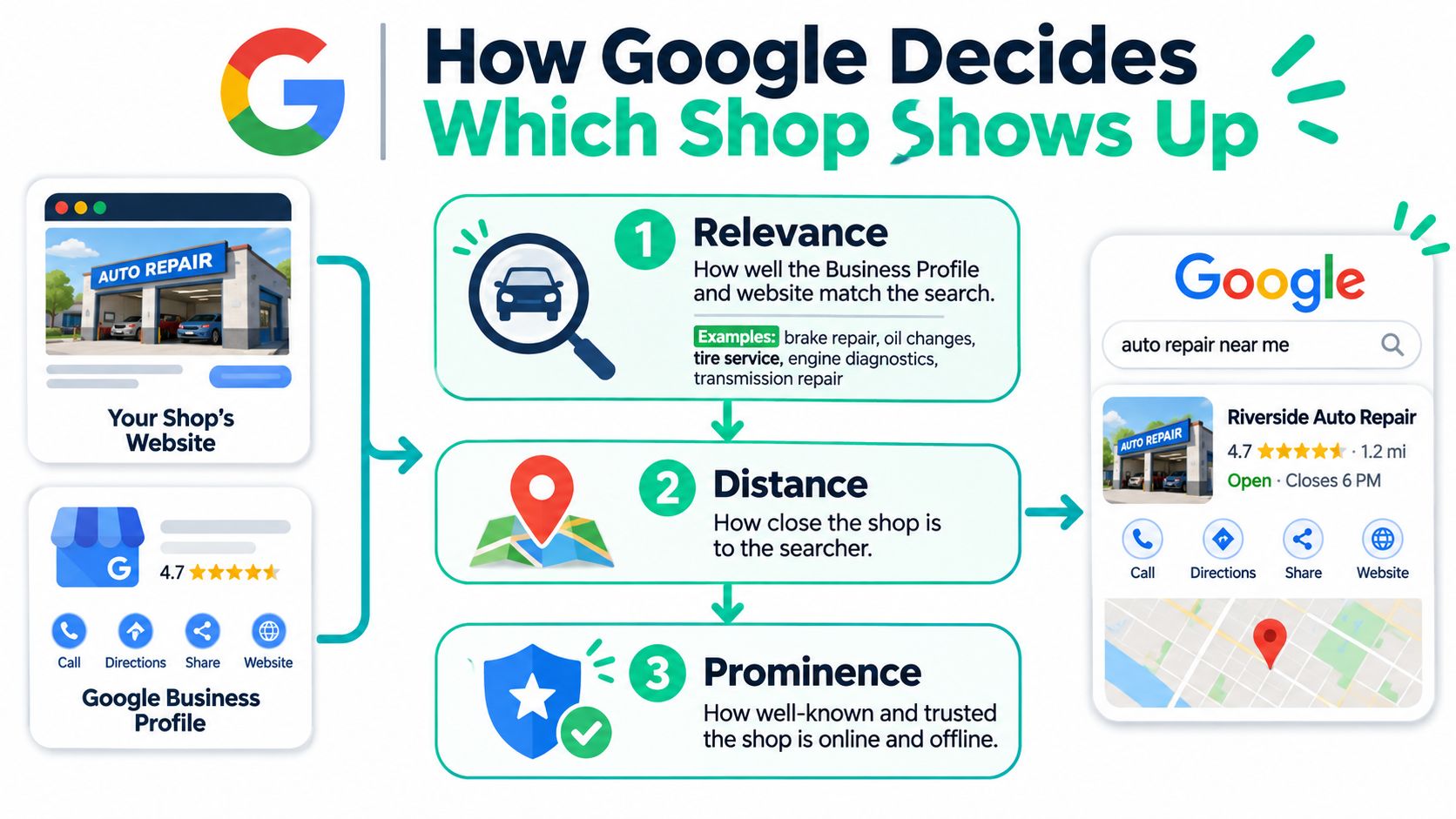
Google describes local ranking through relevance, distance, and prominence in its Business Profile ranking guidance, which also says more reviews and positive ratings can help local ranking. These are useful distinctions because you can improve your information and reputation, but you can't change where a driver is searching.
The filters below show how your shop's information supports local discovery.
Match real services to real searches
Relevance means your profile matches what the person needs. List brake repair, oil changes, tire service, engine diagnostics, and transmission work only when you offer them. A vague description makes it harder for a prospective customer to confirm that you handle their problem.
Distance concerns how far the shop is from the searcher or the location named in the query. A shop near the edge of town shouldn't expect to beat a closer competitor on proximity alone. Adding service areas doesn't move your physical location.
Prominence concerns how well-known the business is. Genuine reviews, accurate business listings, and relevant links from established local organizations help you present a consistent, credible business across the web.
Set up the profile in a practical order
- Claim and verify ownership. Keep access under an account the business controls, and give staff or outside help appropriate permissions.
- Choose the most accurate primary category. Add secondary categories only for services the shop provides.
- Build a useful service list. Match the wording and scope to your website so drivers don't encounter conflicting claims.
- Add current hours, a working phone number, and clear photos of the bays, team, entrance, and completed work.
- Update changes promptly. Holiday hours, temporary closures, and changes in service availability shouldn't surprise someone arriving with a vehicle.
- Make the business name, address, and phone consistent across your website and important listings. Remove outdated details where you can.
Use the business's real name rather than stuffing repair keywords into it. Photograph the entrance from the direction a customer will approach, especially if your shop sits behind another building or shares a lot.
This video offers another way to review the local visibility work.
Set a weekly profile check rather than assuming verification means the work is finished. Look for unanswered questions where that feature is available, incorrect hours, outdated services, and missing or misleading photos.
Not every profile improvement is a direct ranking factor. Some help a driver recognize the building, understand your services, or arrive when you're open. Those details still matter because visibility without confidence or accurate directions doesn't produce a useful visit.
Website Pages That Turn Worry Into a Booking
In AAA's survey of 1,001 drivers in the USA, roughly two-thirds distrusted auto repair shops; among distrustful respondents, 76% cited unnecessary-service recommendations, 73% cited overcharging, and 63% cited negative past experiences, while 64% of all respondents had identified a shop they trusted. That's a reason to show your process, not assume every visitor will remain skeptical.
A statement about honest service doesn't explain what happens when the inspection finds something expensive. Your page should help the driver understand how you diagnose, quote, prioritize, and obtain approval.
Put decision-making information first
On a mobile screen, the visitor should quickly see the exact service, the shop's location, and an obvious phone or scheduling action. Show today's appointment window only if someone can keep it accurate. Otherwise, offer a clear way to check availability.
Use a realistic price range when your shop can explain its boundaries. If a final price requires diagnosis, say what the diagnostic appointment covers and how you'll present the repair estimate.
- Match the need: A brake ad should open a brake page with a relevant headline.
- Show relevant feedback: Choose recent customer comments about the service and communication, not unrelated praise.
- Make contact easy: Use tap-to-call buttons and a short scheduling form.
- Set expectations: Distinguish an appointment request from a confirmed arrival time.
A driver who's safely pulled over shouldn't have to dismiss a large pop-up before finding your number. Test the page on an actual phone, including the form, navigation, and call button.
Replace promises with visible evidence
Farther down, show inspection-photo examples with plain explanations. Include a sample itemized estimate with customer details removed, applicable warranty terms, and current technician certifications.
Explain how your advisor distinguishes urgent repairs from maintenance that can be planned. Don't use a generic urgency label as a substitute for a technician's assessment of the actual vehicle.
Build a dedicated page for each important service rather than placing everything in a single long services list. Good SEO-friendly website design should support both discovery and the practical steps a customer takes to book.
Hand your website editor this checklist:
- Opening screen: Service, location, contact action, availability wording, and relevant proof.
- Estimate process: What diagnosis includes, when pricing is confirmed, and how approval works.
- Competence evidence: Photos, certifications, warranty boundaries, and supported vehicles.
- Measurement: Identify which page produced the qualified appointment and resulting revenue.
Compare pages by qualified bookings and revenue per lead. A form that creates extra administrative work without a suitable vehicle arriving isn't evidence that the page works.
A Review Habit That Builds Trust Every Week
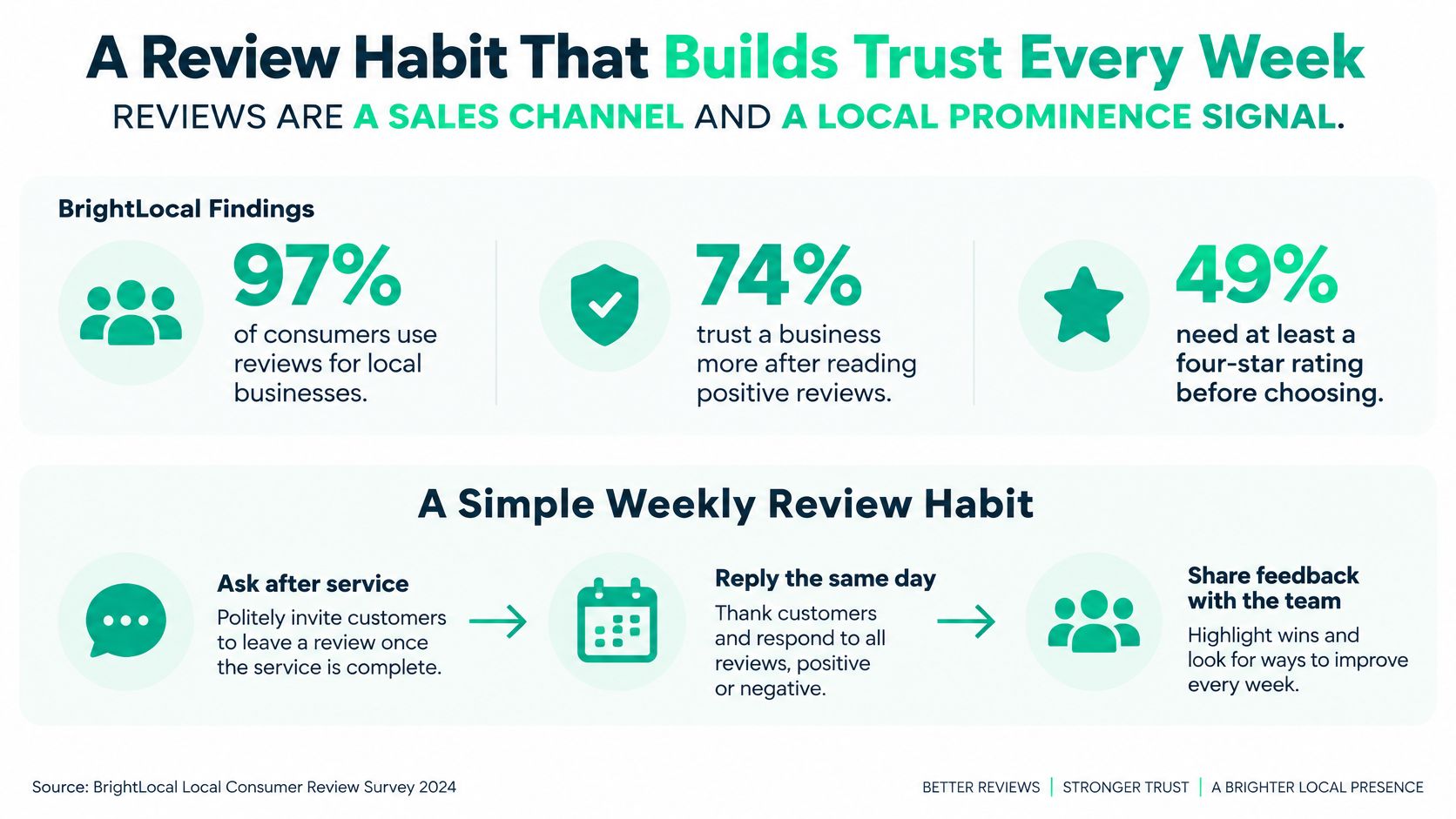
BrightLocal findings cited in automotive industry reporting say 97% of consumers use reviews, 74% pay attention only to reviews from the previous three months, 89% expect responses, 80% are more likely to use businesses that respond to all reviews, and 47% won't use a business with fewer than 20 reviews; automotive services also ranked among the industries where reviews mattered most in its 2023 survey.
Those findings concern consumer evaluation, not a guarantee that reaching a review threshold will produce bookings. For a repair shop, the useful question is whether the feedback helps a driver judge workmanship, communication, and the estimate process.
The visual below summarizes the role of customer feedback in a repeatable review routine.
Make the request part of closing the job
- Ask every customer after completed work. Don't filter the request based on who you think will leave praise.
- Send a short text or email with the direct review destination while the visit is still fresh. Use the customer's agreed communication channel.
- Keep feedback voluntary. Don't offer gifts or discounts for positive reviews, dictate wording, or pressure someone at the counter.
- Reply within a few days. Thank customers for specific details, and address complaints calmly without publishing private vehicle or payment information.
- Use relevant feedback on service pages. With appropriate permission, reproduce the customer's actual words and preserve their meaning.
- Monitor Google first, then the other places your customers use. Assign someone responsibility so complaints don't sit unnoticed.
Our explanation of what customer reviews are can help distinguish public feedback from private survey responses. Both can be useful, but private praise doesn't automatically become a public testimonial.
Write replies that demonstrate accountability
A useful response acknowledges what the customer described. If someone praises the advisor's explanation of an estimate, thank them for that detail instead of posting the same generic reply beneath every review.
For a complaint, check the repair order before responding. State what you can confirm, invite a private discussion where needed, and describe a resolution only if it happened.
Response standard: Write for the customer who complained and the next driver deciding whether your shop will listen.
An old burst of excellent ratings isn't a substitute for current descriptions of how the shop operates. Put the request text and pickup script from the templates below into the advisor's normal closing process, then review feedback with the team each week.
Content and Social Proof for Harder Repairs
Start content planning with questions your advisor already answers. A useful article explains a symptom or process without pretending to diagnose a specific vehicle through a screen.
Use these topics as a practical starting list:
- Check-engine lights: Explain why different faults can trigger the light and what a diagnostic appointment involves.
- Brake noise: Describe warning signs and when a driver should stop driving and arrange professional assistance.
- Battery life: Explain how usage, conditions, and testing affect replacement decisions without promising a universal lifespan.
- Pre-purchase inspections: List what your inspection includes and what it can't establish.
- Itemized estimates: Show how labor, parts, diagnostic work, and optional recommendations appear.
Finish each piece with the matching service page and phone action. Turn the same explanation into a short social clip, using actual shop equipment and work you have permission to show.
Boost posts only when they connect to a specific service, offer, or booking destination. A video's popularity doesn't tell you whether viewers own suitable vehicles or live within practical reach of the shop.
Build proof beyond routine maintenance
For local links, start with relationships that already exist: your chamber, a parts supplier's business directory, a community sponsorship, or a school or fleet you serve. Ask for an accurate business mention where it makes sense, rather than buying unrelated directory placements.
Advanced repairs need more careful evidence. A 2025 Roland Berger survey across 13 markets found 70% of battery-electric-vehicle owners trusted independent aftermarket workshops for simple repairs, versus 53% for complex repairs and 73% for complex work on conventional vehicles, while 47% of independent shops had declined ADAS work during the prior year because they lacked sufficient capability.
The lesson isn't to put electric-vehicle repair into every headline. It's to explain exactly which work your shop can document.
Make advanced-service boundaries visible
For electric vehicles and advanced driver-assistance systems, or ADAS, publish current qualifications, equipment, supported makes, and the documentation customers receive. Separate routine services from high-voltage battery work, sensor diagnosis, and calibration.
Say your shop performs certain camera calibrations but refers unsupported vehicles elsewhere. A useful calibration page would name the supported models and procedures, describe required preliminary checks, and explain the pre- and post-service reports.
It should also state exclusions. If you don't perform battery-pack repair, body alignment, or a particular manufacturer's calibration procedure, don't imply those services are included.
- Show competence: Include relevant certification details and actual equipment photos.
- Explain limits: State warranty boundaries and conditions that require referral.
- Prove completion: Describe the reports and checks supplied with the job.
A narrower, proven service menu gives customers something they can evaluate. A page claiming every advanced repair creates expectations your technicians may be unable to meet.
Measurement and Attribution
Keep answered calls, booked appointments, direction requests, and forms that never become jobs separate. They represent different stages of customer intent, and combining them makes weak campaigns look stronger than they are.
Attach a source tag to each appointment in your shop management software or a simple job log. Useful tags include Google Business Profile, paid brake search, organic diagnostic page, and customer-review referral.
Follow the inquiry through the repair order
Use channel-level call tracking, with campaign or ad-group detail where useful. Record whether a staff member answered, call duration, and the booking outcome. Duration can help flag calls for review, but it doesn't prove an appointment occurred.
Keep your permanent business number consistent in core listings. Configure website number replacement carefully, and test that calls reach the right advisor.
When the appointment becomes a completed repair, retain its source tag and revenue. Import appropriate booking and revenue outcomes into Google Ads so bidding can use meaningful results rather than treating every contact as equally valuable.
Review a small weekly scorecard
| Metric | Calculation | Decision it supports |
|---|---|---|
| Cost per booked repair | Attributable spend divided by booked repairs | Whether acquisition cost is acceptable |
| Revenue per booked repair | Resulting repair revenue divided by booked repairs | Whether inquiries produce worthwhile work |
| Gross margin | Repair revenue less direct job costs | Whether the service supports profit |
| Return on ad spend | Attributable repair revenue divided by ad spend | Where advertising revenue comes from |
Review by service line each Monday. Keep Business Profile calls and direction requests beside the paid results, but don't count a directions tap as a repair.
If there are no bookings, show that plainly rather than calculating a misleading acquisition cost. Keep source entry simple enough that the advisor can finish it in under a minute, and allow an unknown category instead of forcing a guess.
Ready to Use Templates
Give the service advisor a short script before adding more automation. Replace bracketed fields with real details, and check every public claim against your certifications, availability, warranty terms, and pricing.
At pickup and after the visit
Counter script
We'd love your honest feedback about today's visit. With your permission, I'll text you a review link in a few days.
Review request
Thanks for choosing [Shop name] for your brake work. If you have a minute, please share honest feedback about your visit using the review link below. We appreciate hearing what worked and what we could improve.
Add your actual direct review link before sending. Don't change the request based on whether a customer seemed pleased.
In the ad account
Headline pattern
[Repair name] in [City][Verified proof point]
For a brake campaign, the proof point might be documented inspection findings. Use same-day appointments or certified technicians only when those statements are accurate, and make the landing page support the same claim.
Starter negative keywords
- DIY intent: how to, tutorial, do it yourself.
- Parts-only intent: wholesale parts, used parts, parts diagram.
- Unsupported vehicles: motorcycle, heavy truck, or other types you don't service.
- Education searches: mechanic school, training course, apprenticeship.
Review negatives before applying them broadly. A shop that performs transmission replacement shouldn't block the word replacement because some searches concern parts.
Weekly scorecard row
| Channel | Spend | Booked repairs | Cost per booked repair | Decision taken |
|---|---|---|---|---|
| [Channel and service] | [Actual spend] | [Confirmed bookings] | [Spend divided by bookings] | [Keep, adjust, pause, or investigate] |
Add a short reason to the decision. Missed calls require a different fix from irrelevant searches.
Your 90 Day Marketing Calendar
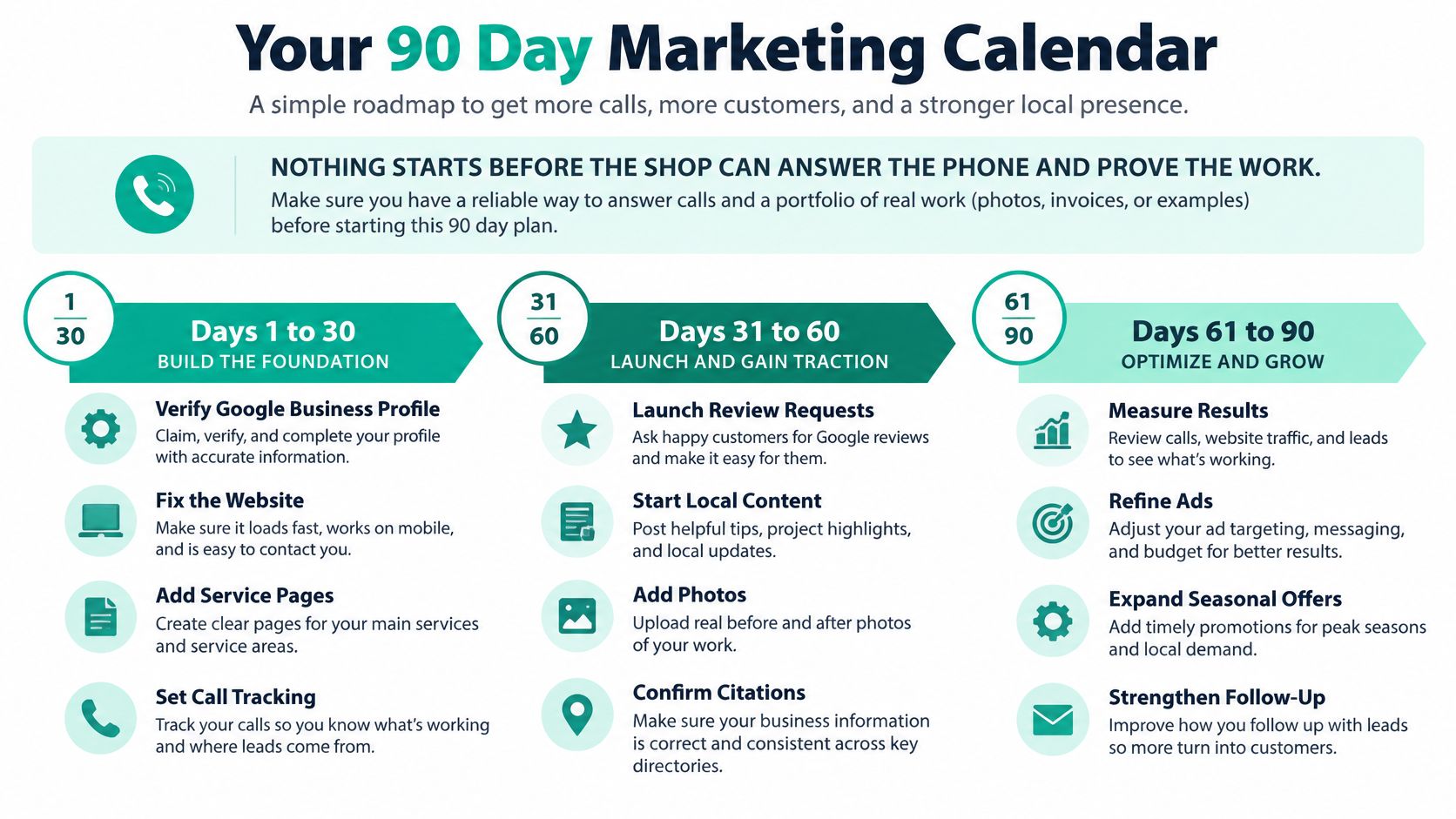
Start only when someone can answer inquiries and explain the work your shop can prove it performs. The calendar is a proposed implementation schedule, not a promise about how quickly rankings or revenue will improve.
Use the roadmap as a visual reminder of the foundation, launch, and refinement stages.
Build before expanding
Days 1 to 30 focus on the profile, contact details, and tracking. Publish three useful service pages and begin requesting honest feedback from every completed customer, rather than waiting until advertising launches.
Test the full customer route yourself. Search for the shop, open the site on a phone, call the displayed number, submit an appointment request, and confirm that the advisor can record the source.
90-day auto repair marketing calendar
| Days | Focus | Concrete actions | Done when |
|---|---|---|---|
| 1 to 30 | Profile, tracking, and reviews | Verify the Business Profile, fix name, address, and phone everywhere, add call tracking, publish three service pages, text every finished customer | The profile phone rings and new reviews arrive each week |
| 31 to 60 | Controlled Search launch | Advertise two or three high-margin jobs, add negatives and matching pages, review booking costs weekly | Staff can connect advertising inquiries to suitable booked jobs |
| 61 to 90 | Refine and test | Shift budget toward proven jobs, publish a documented advanced-service page, answer open reviews, test small-scale retargeting | Spending decisions use repair outcomes and capability claims have supporting evidence |
Use a clear go or wait rule
During days 31 to 60, keep campaign scope narrow enough to diagnose problems. If inquiries aren't becoming appointments, inspect call handling, vehicle fit, and the booking process before increasing spend.
During days 61 to 90, add a proof page for a harder service only if the shop can perform it. Retargeting is optional, not a deadline-driven obligation.
For a preliminary check, our free tools include an SEO Audit Tool, an AI Marketing Budget Planner, and a Google Ads Budget Calculator. Use planning outputs to organize questions, then make spending decisions from your shop's recorded outcomes.
Wait if the profile is incomplete or booked jobs can't be reported. Go cautiously when the basics work and acquisition cost is known, raising spend only on service lines that justify it.
This week, fix the profile and start the review text before spending another dollar on expansion.
We offer a free marketing proposal after reviewing your business details, with a clear plan, pricing, and no obligation. Our free Google Ads audit reviews your account or market and provides a plan to lower cost per lead, which you can assess alongside booked-repair quality. Visit Assertive Agency for a second opinion on your shop's budget, tracking, and next marketing steps.