You tap a local search result on your phone while waiting for coffee. The page opens, but the booking form doesn't. A banner shifts, the hero image takes its time, and the screen seems stuck. You go back and try another business.
For the business behind that page, the visitor's click has already cost something: ad spend, search visibility, or the effort invested in earning the visit. Website speed optimization services aim to make important pages load and respond reliably for the people most likely to become customers, not just produce a better score in a testing tool.
Table of Contents
- Why Slow Pages Lose Mobile Visitors
- What Website Speed Optimization Services Cover
- How Core Web Vitals Guide the Work
- Why a Single Speed Score Misleads
- What Results Look Like for Real Sites
- How to Choose a Speed Optimization Partner
- How to Protect Speed After the Launch
Why Slow Pages Lose Mobile Visitors
A homeowner searching for an HVAC repair company may need to call quickly. Someone comparing auto shops wants to check hours or book a service. A person looking for a local law firm may leave before the contact form appears. Online stores face the same problem when product details or checkout controls arrive late.
These exits matter because the traffic may come from paid ads, organic search, or a campaign the business has already invested in. Speed work protects the value of that visit by helping people reach the information or action they came for.

Google and SOASTA's 2017 mobile-speed research found that a mobile landing page took an average of 22 seconds to fully load over a 3G connection, and 53% of mobile visitors left pages that took more than 3 seconds to load (Google's mobile-speed benchmark research). The same analysis estimated that moving from a one-second load to a seven-second load increased the probability of a visitor bouncing by 113%. When page complexity rose from 400 to 6,000 elements, the analysis found a 95% decline in conversion probability.
Those figures aren't a forecast for every business. They show why waiting can put the value of a visit at risk. A potential customer can't request a quote, compare products, or book an appointment if the page hasn't made the next step usable.
The business question: Can the visitor reach the offer and act on it without waiting through a page that feels stuck?
Slow performance is therefore more than a technical inconvenience. For a local service, it can interrupt the path from search to a phone call. For an online store, it can make a product or checkout page feel unreliable. The specific fixes depend on what is slowing the site, which is why an optimization service should begin by investigating the pages and visitors that matter.
What Website Speed Optimization Services Cover
A useful speed engagement resembles a home inspection. You find the leaks before repainting the walls. In website terms, that means locating the causes of delay before applying quick changes that might improve one test but leave the underlying problem untouched.
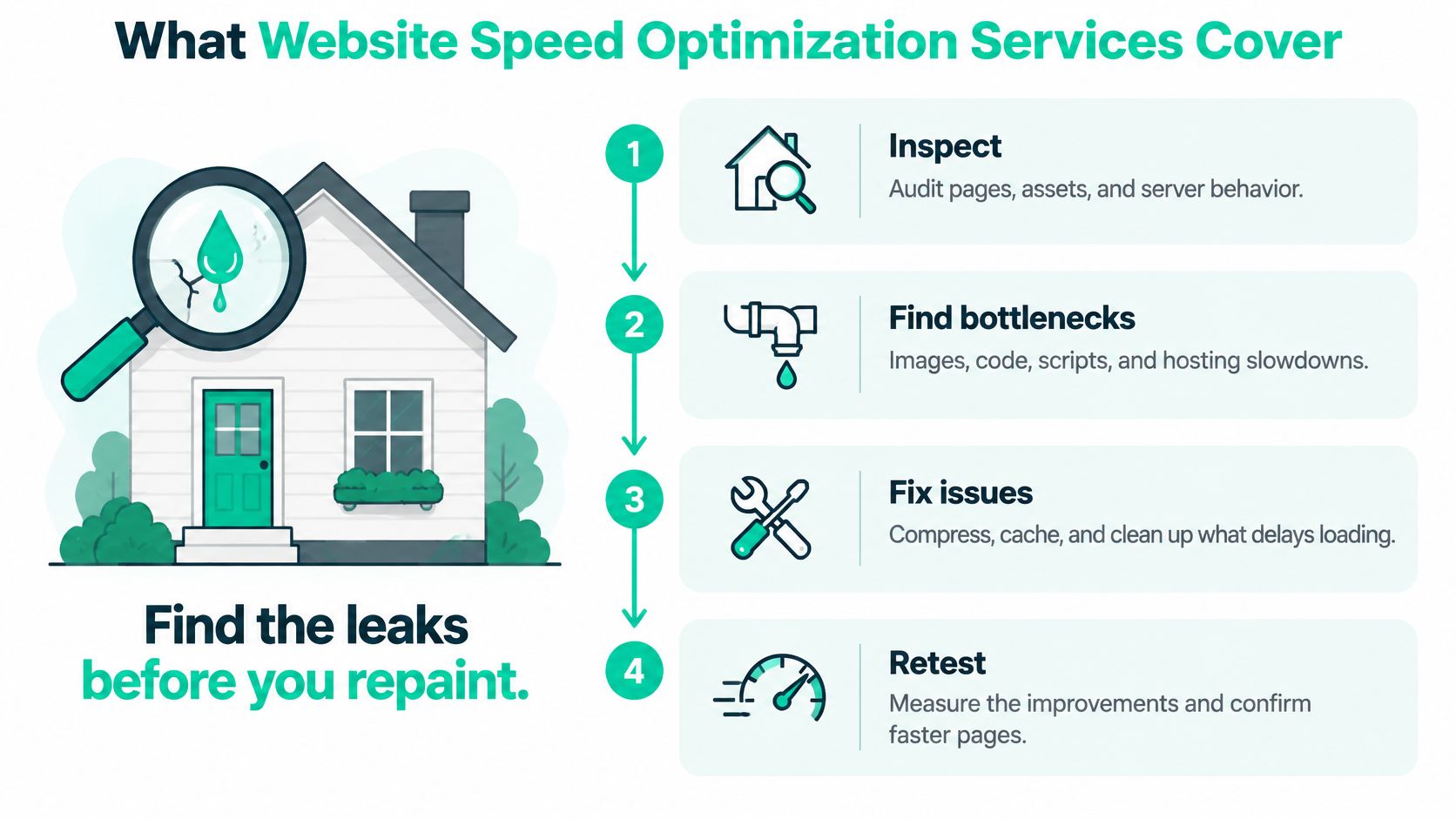
Start with an audit
A technical audit should examine the pages that generate leads or sales, the templates those pages use, how they behave on different devices, and which third-party scripts load with them. That gives the team a map of the problem instead of a single homepage score.
The audit should also identify the platform. A WordPress site may rely on a theme and plugins that affect page weight or JavaScript. A WooCommerce or Shopify store may use product, payment, and marketing integrations. A custom build brings its own code and deployment choices. Platform context helps a team choose fixes that won't disrupt normal site operations.
Find code, hosting, and delivery bottlenecks
Next, developers inspect render-blocking resources, heavy JavaScript, and code that delays the first useful content or a response to a tap. They can adjust how styles and scripts load, remove unused code where safe, and review whether a theme or plugin is adding unnecessary work.
Server response matters too. Hosting and application behavior determine how quickly the site starts sending a page to a visitor. If the origin responds slowly, polishing images alone may not solve the delay.
Caching stores prepared page content or assets so the site doesn't have to rebuild or fetch everything from scratch for each visit. Responsive delivery sends appropriately sized files to different screens and conditions.
Optimize the images people see first
A service should look closely at large, visible images, particularly the main image near the top of a page. Compression and suitable image dimensions can reduce unnecessary file weight while preserving a usable design. Minifying code can help, but compression or minification alone isn't a complete service.
A proposal should make the work and its limits clear. Look for an audit, a prioritized list of bottlenecks, named code or configuration changes, and a plan to retest the pages and forms affected. If a proposal promises a score but doesn't explain what the team will inspect, change, or verify, ask what's missing.
How Core Web Vitals Guide the Work
Speed work gets vague fast without a shared yardstick. Core Web Vitals give a team three concrete questions to answer: when does the main content appear, how quickly does the page react to a tap, and does anything move around while the page loads? Each question maps to one metric, and each metric points toward different fixes.

Google sets a "good" target for each one: 2.5 seconds or less for loading, 200 milliseconds or less for responsiveness, and 0.1 or less for visual stability (Google's Core Web Vitals guidance).
Largest Contentful Paint (LCP) is the loading gauge. It records when the largest visible element finishes rendering, often a hero image, a prominent heading, or a large block of text. A slow server response or an oversized main image is a common reason it lags.
Interaction to Next Paint (INP) is the responsiveness gauge. A visitor taps a booking button and waits while the page catches up. Long JavaScript tasks or extra scripts frequently cause that stall, and Google explains how the measurement works in its Core Web Vitals assessment guidance.
Cumulative Layout Shift (CLS) is the stability gauge. An image without reserved dimensions or an ad that arrives late can shove a button away from the visitor's finger mid-tap. On a phone, that jump can send a lead to the wrong page entirely.
Use field data to decide what to fix
Google evaluates these thresholds at the 75th percentile of real page views. In plain terms, three-quarters of actual visitors need a good experience. A site that flies on a new phone in the office can still fail for shoppers on older devices and weaker connections.
That is why a solid service treats speed as a reliability program for specific audiences rather than a score to chase once. The team should segment field data by page template, device, location, and connection type. The pattern that emerges tells them where to work: a heavy mobile hero image, a form that stutters on one template, a script that only hurts certain pages.
Lab tests still earn their place. They isolate causes and catch regressions after a change ships or a new script gets added months later. Real-user data confirms whether the work improved things for the visitors who matter.
This video offers another visual introduction to how the metrics relate to page experience.
Once the team knows which gauge is failing and for whom, the fixes stop being guesses.
Why a Single Speed Score Misleads
A single desktop test can make a site look healthy while mobile visitors still face delays. “Fast” isn't one number independent of the device, page, and task. The useful question is whether the people who matter can load the page, use its controls, and complete the action the business needs.
The 2025 Web Almanac reports that the median homepage weighs 2.9 MB on desktop and 2.6 MB on mobile. Among pages in the 2-to-3 MB range, 63% of desktop pages passed Core Web Vitals, compared with 53% of mobile pages (2025 Web Almanac performance report). A smaller mobile page doesn't guarantee a better experience. How the page handles scripts, server response, and interaction also matters.
More than half of observed websites use a content management system, according to the same research. That makes platform choices practical, not incidental. A theme, plugin, or app may provide a useful business function while also adding code or slowing a specific template.
Measure the journey, not just the page
Consider a local business with a booking widget. Removing or delaying the widget might improve a lab score, but it could also make appointments harder to request. A store's payment tool or tracking script can affect checkout or measurement. A consent banner, chat service, and personalization feature can also play a legitimate role.
A team should ask: Which changes improve the experience for our mobile visitors who become qualified leads, without breaking tracking, accessibility, personalization, or revenue-generating features? That question calls for field data and an understanding of the customer journey, not an automatic push to remove every script.
For an organization that needs a broader technical review, an SEO audit can assess site issues alongside search performance. The aim is to understand which pages and components deserve attention, then test changes against real visits.
A lighter page is a means, not the result. Judge success by whether the right visitors can use the page reliably, not by file size alone.
The most useful benchmark is the experience of the audience that matters, measured across actual visits. A perfect result on an idealized test phone doesn't settle whether a customer's phone, connection, and page template work well together.
What Results Look Like for Real Sites
A local service business notices that its booking page feels slow on phones. A useful investigation might find that the booking tool loads alongside several other scripts and that the page's main image is larger than it needs to be. The team can test a lighter image, adjust script loading where safe, and check whether visitors can reach and use the form more smoothly. A meaningful business sign would be fewer early exits from that landing template and a form that responds promptly after a tap.
A professional firm may have a large hero image and a chat widget competing with the first content a prospective client needs. The work could focus on delivering the main content sooner and reviewing when the chat script loads. The goal isn't to remove a useful way to contact the firm without checking its value. It's to make the page's main message and next step available without unnecessary delay.
Make the change visible in the customer journey
An ecommerce catalog can present a different challenge. Product images, filters, reviews, analytics, and store scripts all contribute to what the browser must load and process. A team might resize product imagery for the display area, review redundant scripts, and test the path from a product page to checkout. Useful signs include controls that respond after a tap and a layout that doesn't jump as images or other content arrive.
The scale of the challenge remains visible in real-world measurements. HTTP Archive's 2024 Web Almanac found that 38% of mobile home pages earned a good Core Web Vitals rating, compared with 45% of desktop home pages (2024 Web Almanac performance report). For mobile websites, 42% had good Time to First Byte (TTFB), 40% needed improvement, and 19% were classified as poor in that report.
Those figures describe broad measurements, not a prediction for an individual business. They do help explain why strong mobile performance remains work to do. A website may improve after an engagement, then change as new campaigns or features are added. The more useful result is a reliably usable customer journey, supported by ongoing measurement, rather than a permanent trophy score.
How to Choose a Speed Optimization Partner
Compare providers by what they measure, what they plan to change, and what happens after launch. A useful agency selection guide can help frame broader questions, but speed work deserves its own practical checks.
| What to check | Specialist speed shop | General freelancer | Full-service partner |
|---|---|---|---|
| Scope | May focus deeply on performance diagnostics and technical fixes. Confirm whether hosting, platform changes, and retesting are included. | Scope varies by person. Ask which code, platform, and server tasks they can handle directly. | Can connect speed work with development, SEO, analytics, and conversion testing. Confirm who owns each task. |
| Measurement | Ask for field data from CrUX or Search Console, segmented by key templates and devices. | May rely on lab tests unless field measurement is agreed in advance. | Can pair field performance with analytics and business reporting. Check what the report will show. |
| Scripts and functionality | Should inventory scripts and discuss what to keep, delay, replace, or remove. | May need support from your marketing or development team to assess business dependencies. | Can map scripts to leads, consent, accessibility, and measurement if those teams are included. |
| After launch | Confirm who monitors changes and handles regressions. | Ongoing support may require a separate agreement. | May include recurring reporting and optimization, depending on the engagement. |
Ask for a written scope covering the audit, code, hosting, caching, and image work. The provider should identify mobile templates that generate revenue or leads, explain how it will use CrUX or Search Console field data, and describe how technical measures connect to business outcomes.
Be cautious of promises for a permanent Lighthouse grade, desktop-only testing, or broad script removal without reviewing what those scripts do. Cutting analytics can make attribution unreliable. Removing a consent experience can create a compliance problem. A performance plan should explain the trade-offs before changes go live.
Assertive Agency is a full-service digital marketing firm based in the USA and operating since 2020. Its services include technical SEO and Core Web Vitals work alongside WordPress, Shopify, and custom development, conversion-focused testing, and monthly reporting. The engagement options include a free initial audit, Kickstart Growth and Accelerate Success plans, and custom work. Its stated process moves from audit to roadmap, execution, and ROI-based iteration.
That's one option to compare with a specialist shop or a freelancer. Focus on whether a provider can explain the work, protect key site functions, and keep measuring after launch.
How to Protect Speed After the Launch
A performance fix can lose value as a site changes. Marketing teams add campaign tags, developers install plugins, and the business may introduce chat, advertising, or consent tools. A page that performed well after launch can become slower or less responsive when new components arrive.
A recent HTTP Archive-based benchmark puts the share of mobile sites meeting all three “good” thresholds at roughly 40% (2025 Web Almanac performance report). That makes ongoing governance important, especially because JavaScript that blocks the browser can delay a response to a visitor's interaction.

Make performance part of normal releases
Start with a baseline of real-user data, then keep an inventory of scripts and the jobs they perform. A tag may support lead attribution, an accessibility feature, a payment step, consent, or a customer service workflow. Knowing its purpose helps the team decide whether to keep it, delay it, replace it, or remove it.
Set a release budget for the performance impact of new features and check key pages after CMS, plugin, and campaign changes. The budget should help people notice costly additions before they become routine, not prevent the business from using tools it needs.
A script removal is a false win if it breaks lead routing, store events, attribution, or a required consent experience. Before approving a change, agree on both a technical target and a business check. For example, test whether the page responds well on the relevant mobile template and confirm that the form still records and routes submissions correctly.
For teams also reviewing site structure and development choices, SEO-friendly website design can be considered alongside performance governance. The key is to keep design, marketing, and development changes accountable to the same visitor experience.
This week, ask for a free audit that includes mobile field data from the templates that generate leads or sales. Agree on what performance signals to improve and how you'll confirm that business-critical scripts still work before anything is removed.
Assertive Agency offers a free initial audit and ongoing digital marketing support that can connect website speed work with SEO, development, and conversion testing. If your mobile pages are slowing down leads or sales, visit Assertive Agency to discuss a practical plan for measuring and maintaining performance.