


Alphabet reported $294.691 billion in Google advertising revenue for 2025, according to its financial statements filed with the SEC. That's money advertisers paid Google, not proof that every advertiser made a profit. For a small business in the USA, the useful question is simpler: can the right ad bring in a customer at a cost your business can afford?
Table of Contents
- What Google Paid Ads Are and Why They Matter
- Search, Display, Shopping and YouTube Ads Compared
- How the Google Ads Auction Picks Your Position
- Targeting Options to Set Before You Spend
- Pricing Models Explained With CPC, CPM, CPV and CPA
- Setting Up Your First Campaign Without Wasting Budget
- Decide Whether Google Paid Ads Fit Your Budget
What Google Paid Ads Are and Why They Matter
Google paid ads are ads you bid on so they can appear when people search on Google or browse Google-owned and partner sites and apps. Think of renting a shop window on a busy street. You choose the message, the times you want attention, and the people you hope will notice.
Alphabet reported $74.18 billion in Google advertising revenue for the third quarter of 2025, compared with $65.85 billion in the third quarter of 2024, in its quarterly financial results. Search accounts for most of Google's advertising business, which helps explain why buyer intent matters: someone searching for emergency furnace repair has a different need from someone casually watching home-improvement videos.
You aren't buying a fixed spot on the page. You're bidding for a chance to appear when someone wants what you sell.
Local service companies, online stores, and businesses that collect leads can all benefit. The main choices are Search, Display, Shopping, and YouTube. Choosing among them means understanding where ads appear, what triggers a charge, whom you target, and how you'll recognize a worthwhile result.
Search, Display, Shopping and YouTube Ads Compared
Google paid ad formats at a glance
| Format | Where ads appear | Best for |
|---|---|---|
| Search | Google results pages, above and below organic listings, and some partner sites | Buyers actively typing a need |
| Display | Google Display Network websites, apps, and Gmail, depending on campaign type | Awareness and returning visitors |
| Shopping | Product listings in Search, the Shopping tab, and Google Images | Shoppers comparing products and prices |
| YouTube | In-stream videos, bumper ads, in-feed videos, and Shorts | Demos, brand reach, and video viewers |
The visual comparison below shows how the same advertising budget can serve very different purposes.

Match the format to the customer's task
Search ads are usually text-based ads that appear when someone enters a query. A person searching for brake repair near me is already naming a problem, so an auto repair shop can offer a direct next step, such as booking an inspection.
Display ads use images and text across websites and apps. They're useful for introducing a business or reminding previous visitors about something they considered, but the viewer may not be shopping at that moment.
Shopping ads show a product's photo, price, and store name. Google uses product information supplied through Google Merchant Center, so your product feed needs accurate prices, availability, and landing-page details. Without a product feed, a business can't run Shopping ads.
YouTube ads let you demonstrate a product or explain a service through video. Formats include skippable in-stream ads, which viewers can skip after five seconds, six-second non-skippable bumper ads, and in-feed ads displayed alongside video content.
Choose based on readiness, not appearance
For someone ready to buy, Search or Shopping usually provides the most direct route. A plumbing company can answer an urgent service query; an online store can show the exact item a shopper wants.
For awareness, Display or YouTube gives you room to introduce the business before someone searches for it. A roofing company might use video to explain warning signs of roof damage, while a retailer might show product images to previous visitors.
The distinction is similar to the difference between search advertising and ads on social media: sometimes you answer an existing need, and sometimes you introduce an offer while people are doing something else. Judge the campaign against that job rather than expecting every impression to produce an immediate sale.
Performance Max can use a set of creative assets across multiple Google surfaces. That can simplify delivery, but it doesn't remove the need for a clear goal, useful landing pages, and dependable conversion signals. Give the system a business outcome to pursue, not just a collection of images.
How the Google Ads Auction Picks Your Position
Google runs an auction whenever an eligible ad could appear. Ad Rank determines whether an ad can show and where it appears relative to competing ads, using bids, quality, minimum thresholds, competition, search context, and the expected effect of assets such as sitelinks, according to Google's explanation of the ad auction.
Think of a ticket line where paying more doesn't automatically guarantee the front seat. Google also considers whether your ad and destination are useful for that particular search.

Why the higher bid doesn't always win
Suppose two bakeries bid for gluten free birthday cake. In this hypothetical example, one bids $3 and sends visitors to a generic homepage; the other bids $2 and sends them to a gluten-free cake page with clear prices.
The second bakery could earn the better position. Its lower bid doesn't guarantee a win, but its closer match to the search can improve its competitiveness. Device, location, time, and the wording of the query also affect the auction.
Quality Score is a separate diagnostic, not your auction score. Google's Quality Score guidance describes a 1-to-10 scale based on expected click-through rate, ad relevance, and landing-page experience, and states that the score itself isn't a direct auction input.
Practical rule: Use Quality Score to find weak spots. Don't treat it as a price formula or a promise of better placement.
Check whether visibility is worth buying
Look beyond position when reviewing results:
- Impression share: The share of eligible impressions your ad actually received. It helps show how much available visibility you're capturing.
- Top-of-page rate: How often your displayed ads appeared above unpaid results.
- Conversion value: The revenue or assigned business value associated with conversions.
A higher position is only useful if it helps generate enough business value to justify the additional cost.
Targeting Options to Set Before You Spend
Targeting decides which opportunities you're willing to pay for. Start with the searches and places that fit your business, then refine delivery. A local service company doesn't need attention from everyone who might find its ad interesting.
Set the boundaries first
- Keyword match types: Broad match reaches related searches. Phrase match focuses on searches that include the meaning of your keyword, not necessarily its words in a fixed order. Exact match is narrower, but it can still include searches with the same meaning or intent.
- Negative keywords: Exclude searches you don't want. A paid repair service might block jobs, training, free, or DIY, provided those exclusions don't remove valuable customer searches.
- Location: Choose the country, state, city, or service radius you can serve. Check whether the setting includes people interested in that location or focuses on people present in or regularly in it.
Say a plumber in Ohio chooses a hypothetical 15-mile service radius, uses phrase match for emergency plumber, and excludes jobs and training. The important step is checking the actual search terms afterward, rather than assuming the keyword setting will screen out every poor match.
Refine how and when people see ads
Device and scheduling settings should reflect how you handle customers. If someone must answer a phone call, don't encourage urgent calls when nobody can respond. Review device performance before assuming mobile or desktop traffic is better.
Audiences add another way to reach people. In-market segments focus on people researching relevant purchases; custom segments use inputs such as search interests and browsing-related signals; remarketing audiences include eligible previous visitors.
For Display and YouTube, topics and placements help control the content around your ads. Demographic options, including age and household income where available, can refine delivery, but avoid narrowing an audience based only on assumptions about who buys.
Use the video below as a visual companion while reviewing the settings in your account.
Pricing Models Explained With CPC, CPM, CPV and CPA
How each Google paid ad pricing model charges you
| Model | You pay when | Usually used for | What it means for you |
|---|---|---|---|
| Cost per click (CPC) | Someone clicks the ad | Search, Shopping, some Display | You pay for traffic, but clicks don't guarantee sales |
| Cost per thousand impressions (CPM) | The ad receives a thousand impressions, subject to the campaign's impression rules | Display, YouTube, awareness campaigns | Useful for reach, but you pay without needing clicks |
| Cost per view (CPV) | A viewer watches thirty seconds, finishes a shorter in-stream ad, or interacts | YouTube video campaigns using CPV | Short skips generally don't trigger a view charge, but interactions can |
| Target CPA | Google adjusts bids to pursue conversions at your target average cost | Lead and sales campaigns with dependable conversion history | It's a bidding goal, not a guaranteed fee per customer |
Understand what you're actually buying
CPC is like paying a salesperson whenever someone answers the door. You've paid for an opportunity to start a conversation, not for a completed sale. A visitor can click, read the page, and leave without buying.
CPM is closer to renting a billboard. You're buying exposure, so the creative needs to communicate quickly and reach a relevant audience. Impression-based campaigns make more sense when you have a reason to build awareness and a way to evaluate what that awareness contributes.
CPV is designed around video viewing or interaction. It gives you a different buying unit from a click, but a paid view still doesn't prove someone understood your offer or became a customer. Put the problem, benefit, or demonstration near the beginning rather than saving everything for the ending.
Target CPA, meaning target cost per acquisition or action, is different from the other terms. It's an instruction to automated bidding: pursue conversions around an average cost you specify. Individual conversions can cost more or less, and ordinary target CPA bidding doesn't mean you're charged only when a lead arrives.
Let customer economics set the limit
A cheap click isn't automatically a bargain. If the visitor wants a free tutorial and you sell professional installation, you may have bought the wrong audience at an attractive price.
Use Keyword Planner to inspect estimates for your keywords and service area. Industry, competition, location, and query intent all affect likely costs, so a general average cost per click is context, not a budget promise.
A useful target starts with what a customer is worth, not with the lowest price available in the account.
Google's measurement guidance for automated advertising emphasizes the Google tag, consent signals, analytics integration, enhanced conversions, and first-party data. That matters because automated bidding follows the outcomes you report. If you report every form submission as equally valuable, the system can't reliably distinguish a serious buyer from a poor-quality inquiry.
Setting Up Your First Campaign Without Wasting Budget
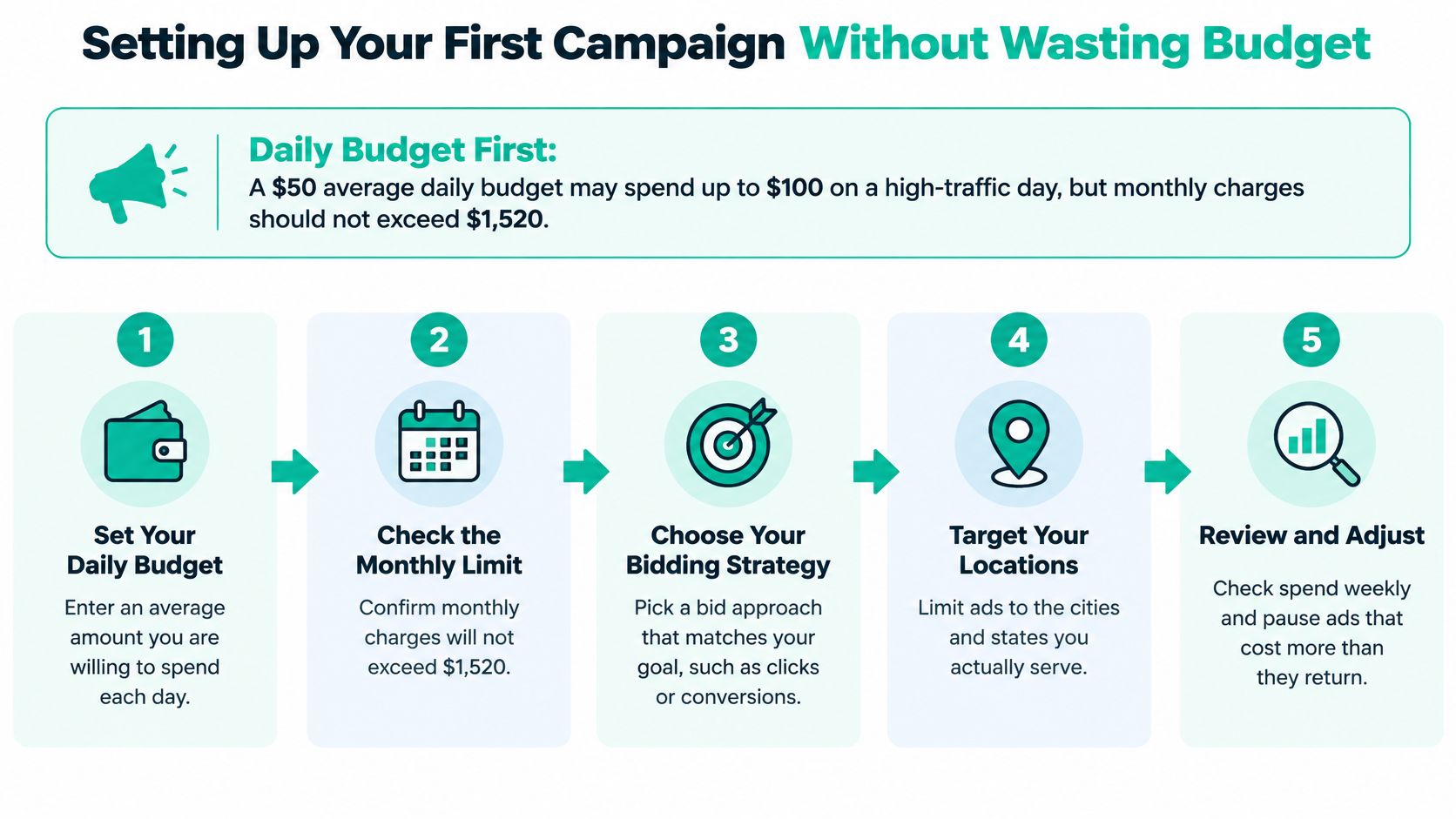
An average daily budget isn't a hard daily spending cap. Under Google's budget and overdelivery rules, a campaign not paying for conversions with a $50 average daily budget may spend up to $100 on a high-traffic day, while its monthly charging limit is $1,520, calculated using 30.4, subject to campaign and billing conditions.
Use the budget illustration below to plan for uneven daily spending rather than assuming every day will cost the same.
Build the campaign around a measurable outcome
Choose a main goal. Decide whether success means a purchase, a qualified phone call, or a useful form submission. Don't make casual page visits your main bidding goal when you need paying customers.
Set an affordable budget. Choose an amount you can sustain through a meaningful testing period. Leave room in your cash planning for daily spending fluctuations.
Select location and language. Match these settings to the people you can serve and the language your landing page supports. Check the location options before publishing.
Build tightly themed ad groups. Keep closely related keywords together and write ads that answer their shared need. Send each group to a relevant page, not automatically to your homepage.
Install and test measurement. Configure the Google tag and Google Analytics 4, then complete a test purchase or lead action. Confirm the right event appears without being counted twice.
Choose bidding deliberately. Start with an available manual or straightforward strategy you understand. Move toward target CPA when qualified conversion data is reliable and reasonably consistent, not just because the account has reached a generic conversion count.
Review search terms weekly. Add negative keywords and investigate spending that produces irrelevant inquiries. Keep notes so you can connect changes with later results.
Check the sale, not just the submission
For phone leads, configure call tracking and define what makes a call valuable. For forms, Google's enhanced conversions guidance explains how consented, user-provided information can be hashed and matched to improve measurement when direct attribution is limited. This isn't a way to bypass consent or guarantee that every lead will match.
Import qualified leads and offline sales when possible. A signed job tells you more about business performance than an unverified inquiry.
Google's advertising measurement discussion acknowledges missing signals and fragmented customer journeys. Compare platform results with analytics diagnostics and your CRM or sales records; investigate conversion delays, duplicate events, and changes in lead quality before treating a lower reported CPA as an improvement.
Decide Whether Google Paid Ads Fit Your Budget
Before spending, answer these questions:
- Capacity: Can your team handle new leads or orders promptly?
- Profit: Do you know how much profit a sale or booked job earns?
- Measurement: Can you connect calls, forms, and purchases to advertising?
If you can, start with a focused campaign that fits the buying task. Choose Search for an active service need or Shopping for physical products supported by a product feed. If you can't measure outcomes yet, fix that before launch.
Use Keyword Planner for demand and cost estimates, and Performance Planner where your account is eligible. Our free Google Ads Budget Calculator shows estimated clicks, leads, and a profit check for a recommended budget. Treat forecasts as planning tools, not promised results.
Keep the account, data, and tracking under your ownership. When we manage campaigns, they remain yours, and we work inside your account with manager access.
We offer a free Google Ads audit that reviews your account or market and sends you a plan to lower cost per lead. Visit Assertive Agency to request an audit and identify which targeting, budget, and tracking changes deserve attention before you spend more.
