


Remarketing re-engages people who already visited your site or app using first-party interaction signals. It works by recording eligible interactions, building audiences, checking whether those audiences can receive personalized ads, and entering ads into an auction before measuring the results.
You might run a small USA store where shoppers browse products, add something to their cart, and leave without buying. Or you might own an HVAC company where someone reads your replacement-service page but doesn't request an estimate. You've already earned their attention. The practical question is whether you can follow up with a useful message, with the right permission, without wasting money on someone who was never likely to buy.
Table of Contents
- What Remarketing Actually Means in Practice
- Audience Types Every Remarketing Strategy Uses
- How Dynamic Remarketing Works Under the Hood
- Where Remarketing Ads Actually Show Up
- Consent Mode and the Audience Size Trap
- Proving Incremental Revenue Instead of Last-Click Clicks
- Best Practices for Launching a Remarketing Campaign
What Remarketing Actually Means in Practice
Remarketing starts with an existing interaction, not a cold audience. For a small USA retailer selling outdoor equipment, that interaction might be a shopper viewing a hiking backpack. The advertiser's job is to turn that signal into an appropriate follow-up, not assume every visitor should receive the same promotion.
Google's remarketing documentation distinguishes standard remarketing, which reaches previous visitors, from dynamic remarketing, which adapts the creative to the specific product or service someone viewed. A store-wide reminder and an ad featuring the backpack serve different purposes.
From a Visit to an Ad
The delivery pipeline has distinct checkpoints:
- Tagging: Website or app code records a qualifying visit or action, subject to the relevant permission and settings.
- Audience formation: The advertiser defines rules, such as viewing a product page or starting checkout.
- Eligibility: The platform checks whether the audience can be used. Recording a visit doesn't automatically make someone eligible for personalized advertising.
- Ad auction: When an eligible advertising opportunity appears, the campaign competes to show its ad.
- Impression: If the ad wins and is delivered, the person sees it.
- Conversion measurement: The advertiser checks whether the person later completes the intended action, such as purchasing or submitting a qualified inquiry.
The visual below shows the practical campaign workflow surrounding those delivery checkpoints.
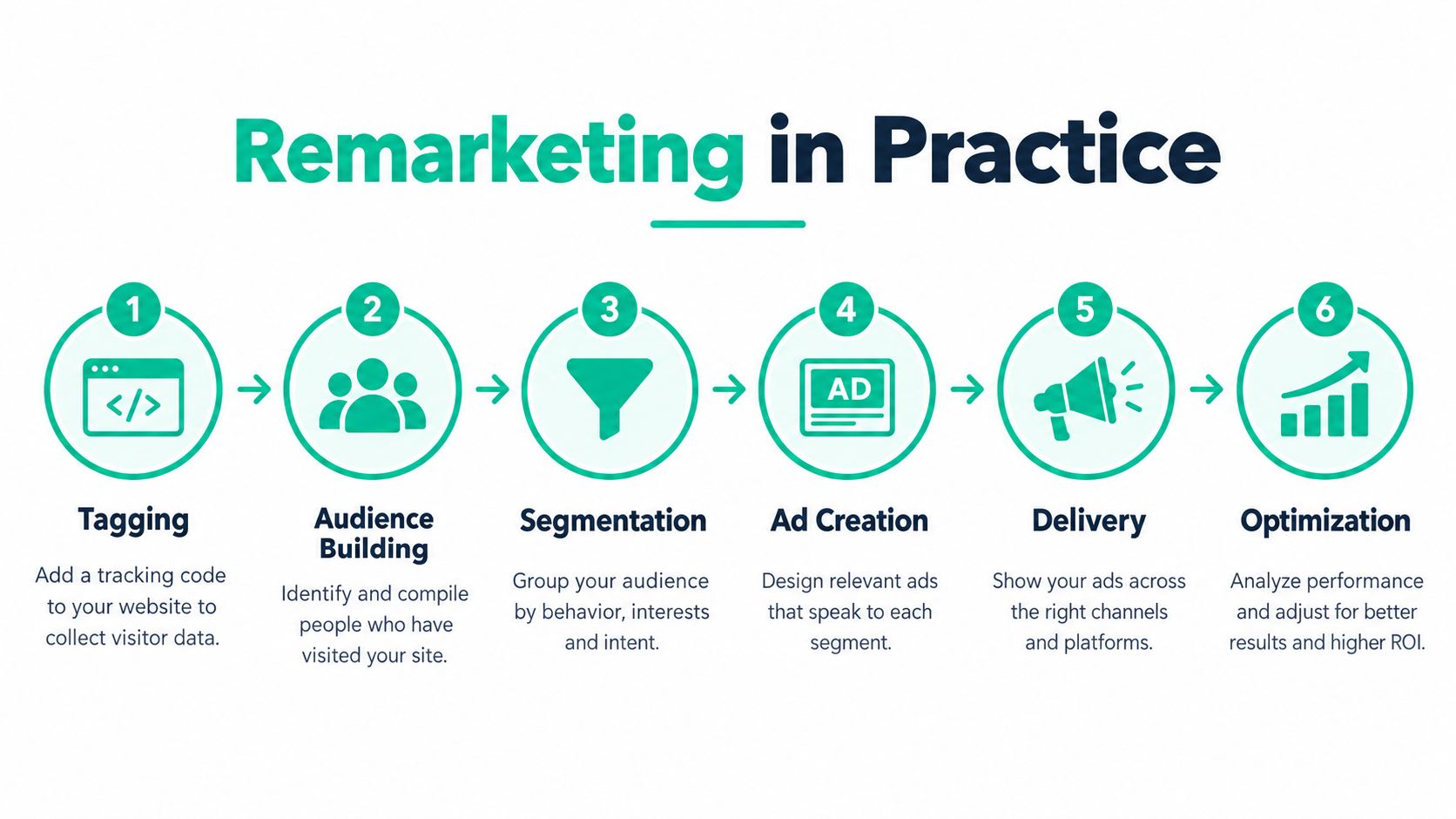
Suppose the backpack shopper later browses a Google partner website. If the audience and advertising opportunity qualify, the retailer can show a relevant reminder rather than a generic introduction aimed at strangers. That doesn't mean the retailer controls every subsequent page the shopper visits.
Practical rule: A recorded interaction is the start of the process, not a promise that an ad will appear.
Browser restrictions, frequency controls, consent, and auction conditions can all affect delivery. Tags also shouldn't contain personally identifiable or sensitive information. When someone asks, "What is remarketing and how does it work?" the useful answer is this complete sequence, not that an ad follows a visitor.
Audience Types Every Remarketing Strategy Uses
A shopper who briefly views a product isn't in the same position as someone who reaches checkout. A previous purchaser needs a different message again. Audience segmentation lets you make those distinctions before writing ads or setting bids.
For a retailer, start by separating browsing behavior from purchase behavior. For a local service business, use the same logic to distinguish service-page visitors, unfinished inquiries, and customers who have already booked.
The diagram shows common audience buckets to consider.
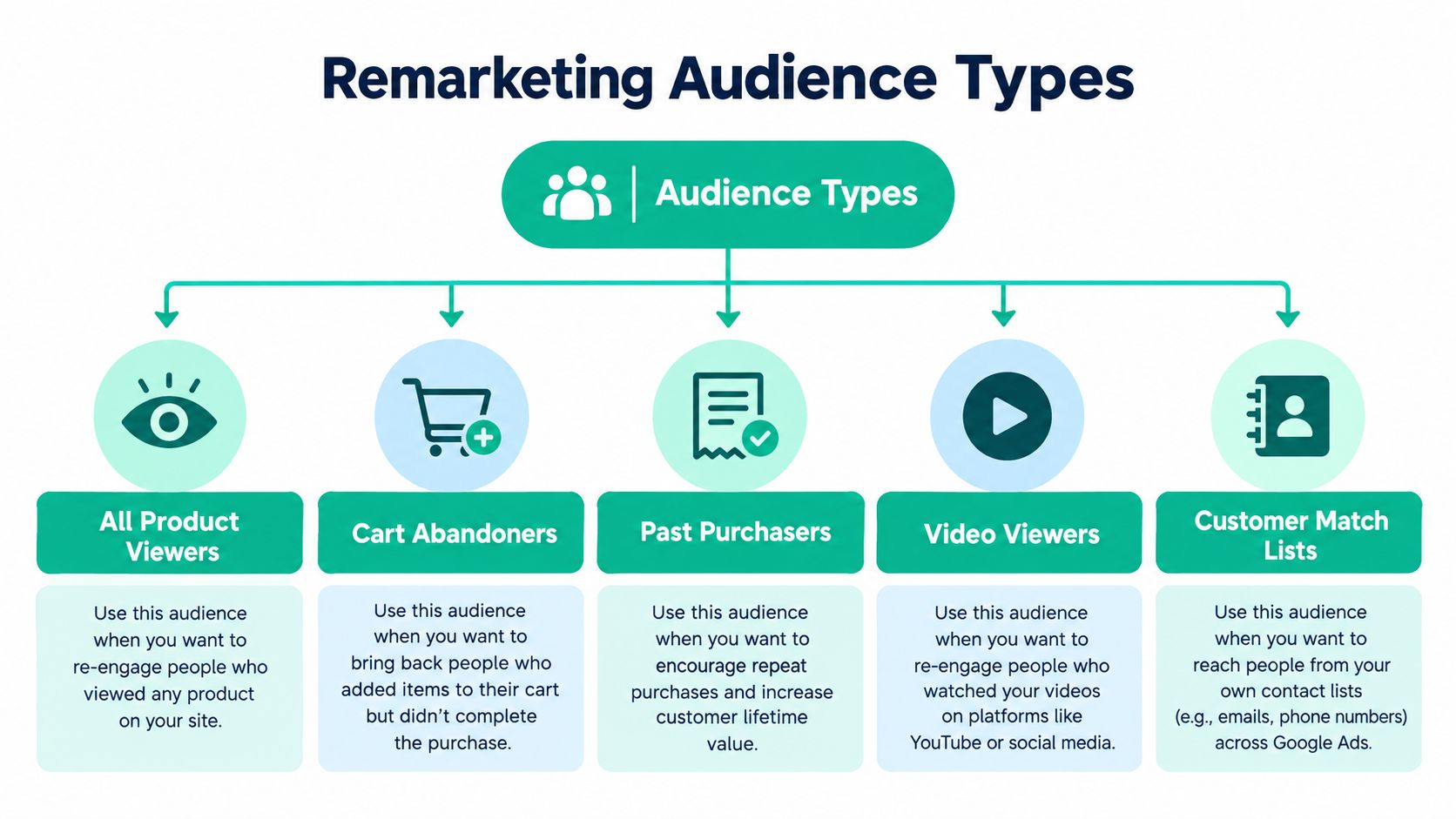
Match the Audience to the Next Decision
- All product viewers: Consider a broader reminder that helps shoppers evaluate the store, product category, or buying experience. A page view alone isn't a strong reason to offer a discount.
- Cart abandoners: Focus on completing the transaction. Address a genuine obstacle, such as uncertainty about delivery or returns, rather than automatically reducing the price.
- Past purchasers: Use a separate customer strategy. Recommend a relevant accessory or replenishment purchase instead of continuing the original acquisition pitch.
- Video viewers: Treat engagement as a possible starting signal where the platform supports it. Don't assume watching educational content means someone is ready to order.
- Customer Match lists: Build from information customers shared directly with your business, not purchased contact databases.
Google's Customer Match policy limits these lists to directly collected first-party customer information and requires consent where applicable law or Google's policies demand it. It also prohibits using Customer Match to identify sensitive categories about individual customers.
Audience Rules and Campaign Types Aren't the Same
An audience describes who qualifies. Standard or dynamic remarketing describes how you address them, while search remarketing reaches eligible previous visitors during follow-up searches. Customer Match provides another audience-building route through directly collected customer records.
For example, recommend a standard brand reminder to a casual browser, product-specific creative to a shopper showing stronger interest, and search messaging to someone actively comparing options again. These are planning choices, not guaranteed performance rankings.
Removing purchasers from acquisition-oriented campaigns can avoid paying to repeat an irrelevant offer. Moving them into a separate customer campaign gives you room to pursue repeat business without treating them like first-time prospects.
How Dynamic Remarketing Works Under the Hood
Dynamic remarketing is a feed-and-event matching problem. The ad platform needs to connect what someone viewed with the correct entry in your product or business feed. If those records don't agree, attractive creative won't repair the underlying setup.
Google's dynamic remarketing setup guidance describes the structured parameters used to connect site interactions with feed items. For implementation, check the identifiers, event values, consent state, and conversion measurement together.
The diagram separates the feed from the tracking events that reference it.
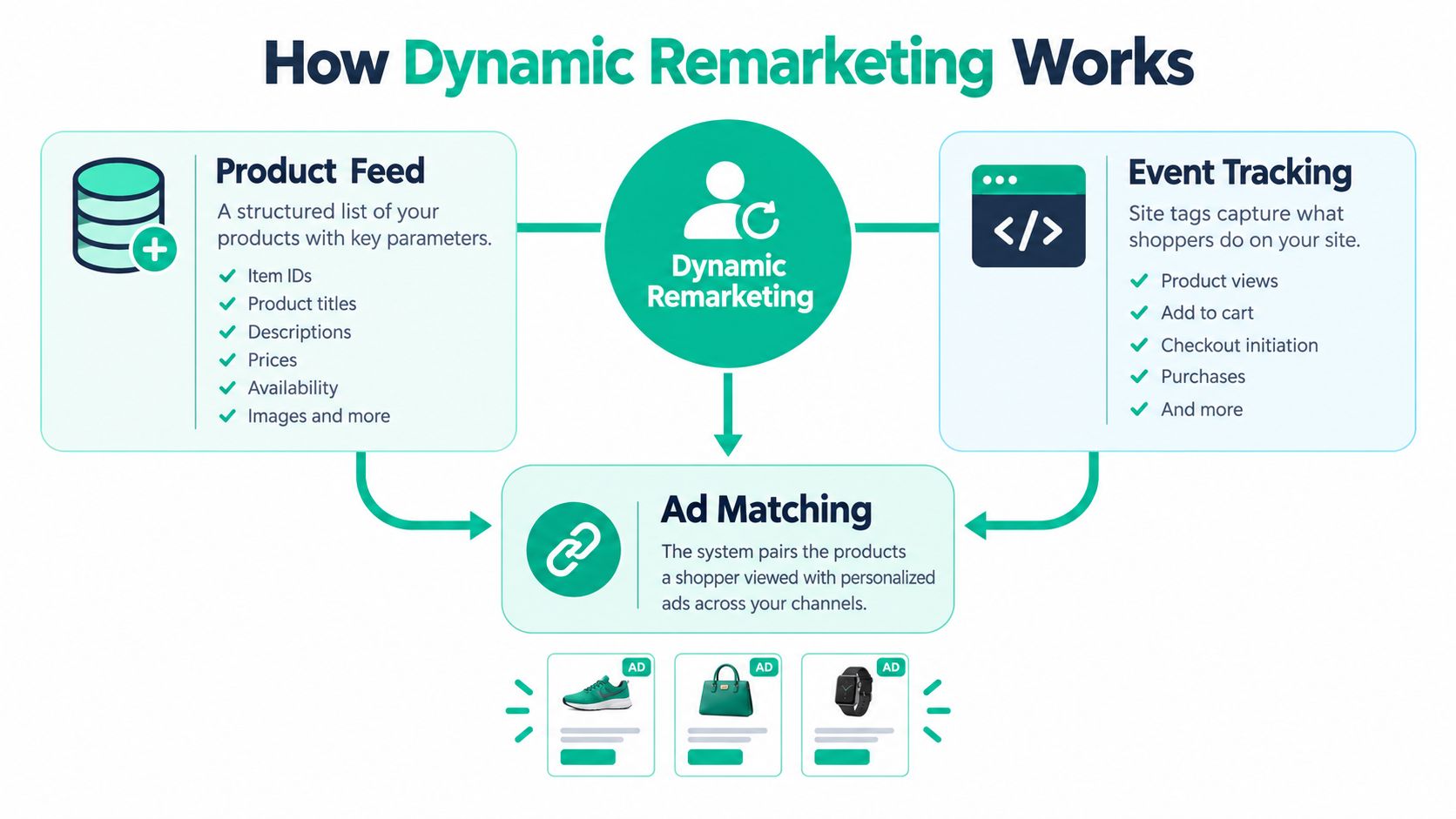
Follow a Product Through the System
Consider a hypothetical WooCommerce store whose backpack has the stable item identifier trail-pack-blue. Its product-view event should reference the same identifier that appears in the advertising feed. The platform can then match the viewed item to the corresponding assets.
Apply the same test to a hypothetical Shopify store. Don't assume a working storefront means its advertising events and feed agree. Inspect the actual values, particularly when product variants have different identifiers.
- Validate the match: Confirm that the event's item identifier exists in the feed and points to the intended product.
- Check the journey: Test product viewing, adding to cart, and completing checkout as connected actions.
- Verify the transition: After a purchase, confirm that the shopper no longer qualifies for the unfinished-cart campaign.
- Test measurement: Check conversion attribution across browsers and devices rather than relying on a single successful test order.
Consent handling belongs in this technical review. A developer shouldn't treat permission as an unrelated banner while allowing advertising events to run independently of the recorded choice.
Inspect Before Increasing Spend
A useful debugging question is: “Can we trace this viewed item from the page event to the feed and then to the intended ad?” If the answer is unclear, fix the connection before expanding the campaign.
Use the accompanying video alongside an inspection of your own implementation.
Where Remarketing Ads Actually Show Up
Choose placements by the decision you want someone to make next. An HVAC visitor searching again for installation help presents a different opportunity from a shopper casually browsing other content. I'd prioritize that difference over an assumed ranking of cheapest channels.
The comparison below is a planning guide, not a universal cost or performance benchmark. Actual costs need to be evaluated against qualified outcomes in your own campaign.
Remarketing Placements Compared
| Placement | Audience Intent | Creative Format | Typical Use Case |
|---|---|---|---|
| Google Display Network | Prior interest, without necessarily searching now | Visual reminder creative | Bring a product browser back to evaluate or buy |
| Google Search remarketing | Prior interaction plus a current search | Search-ad messaging | Reconnect with someone comparing providers |
| YouTube | Depends on prior behavior and current viewing context | Video creative | Address an objection or demonstrate an offer |
| Facebook or Instagram | Prior interest within a social browsing context | Image or video creative | Reintroduce a product through a useful visual message |
For Google Display, I'd give the reminder a specific job. A backpack ad could invite the shopper to revisit fit information rather than merely repeat the store logo. Judge the placement by whether it helps people resume a meaningful buying step.
For Google Search, the practical opportunity is the follow-up query. An auto repair prospect returning to search for service can receive messaging that reflects prior interaction. Don't mistake that combination of signals for certainty that they'll book.
Pick a Format You Can Support
For YouTube, consider whether a short demonstration would resolve uncertainty better than a static reminder. An HVAC company could plan creative explaining what happens during an estimate visit. That's a suggested use case, not a claim that video will outperform search.
For Facebook or Instagram, plan the audience, Meta pixel and Conversions API implementation review, consent checks, and visual creative together. A product demonstration might fit the browsing context better than an aggressive checkout demand. This guide to ads on social media offers additional context for planning paid social alongside other placements.
Don't choose a channel because someone calls its clicks cheap. Choose it because you can connect its spending to the customer action you need.
If the budget is limited, start where you can explain the intended outcome, produce suitable creative, and verify measurement. Expanding everywhere at once makes it harder to identify what's helping.
Consent Mode and the Audience Size Trap
A larger analytics audience isn't automatically a larger advertising audience. Some recorded visits won't qualify for personalization, and a correctly configured campaign can still lack enough eligible users to serve.
Google's Consent Mode guidance separates measurement from personalization. When users deny ad personalization, remarketing and personalized advertising are disabled; when storage is denied, consent-aware tags avoid storing cookies or device identifiers and may send cookieless measurement signals instead.
The consent choice needs to govern the underlying implementation, not just the visible pop-up.

Measurement Permission Isn't Audience Permission
Can you measure a visit without being allowed to remarket to that person? Often, consent-aware or modeled measurement is possible, but that doesn't authorize building a personalized audience from the denied interaction.
Keep these functions separate during implementation:
- Audience eligibility: Can this interaction qualify for the intended advertising segment?
- Ad personalization: Has the required permission been granted?
- Conversion measurement: What measurement is permitted under the applicable settings and requirements?
- Consent records: Can you verify the choice the person made and how your tools applied it?
A USA business serving customers elsewhere may also need destination-specific checks. For Customer Match personalization in the European Economic Area, Google requires both ad_user_data and ad_personalization to be marked GRANTED; missing signals are treated as consent not granted.
The Minimum That Can Stop Delivery
Google Display, Search, and YouTube remarketing audiences require at least 100 active visitors or users during the previous 30 days before they can be used for targeting, according to Google's audience eligibility requirements. Active users aren't everyone counted in an analytics report, and missing cookies can prevent proper audience population.
A new store can therefore have functioning tags and no remarketing delivery. Check eligibility before assuming the creative or bid is broken.
Buyer's perspective: I'd rather plan around a permission-based audience I can verify than a larger pool I can't reliably activate.
Proving Incremental Revenue Instead of Last-Click Clicks
An attributed conversion isn't proof of an additional sale. A shopper may see an ad and purchase afterward even though they already intended to return. View-through reporting can record that sequence without proving the impression caused the purchase.
A published experiment summarized by the American Marketing Association found 14.6% more users returned within four weeks, with 33% of the first-week advertising effect occurring on the first day. The same summary describes product-specific dynamic ads as initially less effective than generic brand ads, but more effective after stronger purchase-interest signals emerged. These findings support testing timing and message relevance, not treating the lift as a universal benchmark.
Compare Against What Would Have Happened Anyway
Use a holdout test to compare eligible people who receive remarketing with a comparable group who don't. Where practical, a geo-based experiment can compare outcomes in similar areas with different advertising exposure. Set the comparison up carefully so unrelated changes don't dominate the result.
- Retailers: Evaluate additional sales and their economics, not just recovered-cart labels.
- HVAC and auto repair: Track qualified inquiries and booked jobs.
- Law firms and other local services: Assess suitable consultations and lead quality while respecting sensitive-interest restrictions.
Use marketing funnel examples to define the customer outcome you'll test. A click is an intermediate action, not the final business result.
Know When to Reduce Exposure
A consumer research summary discussing privacy and retargeting fatigue reports declining browsing-based retargeting effectiveness alongside improving cross-device and cross-platform effectiveness. That's a reason to review repetition and channel coordination, not automatically expand reach.
Set frequency controls where available, rotate creative, and define exclusion windows after purchase. Suppress low-intent visitors when their inclusion doesn't support the campaign's purpose. If a sound comparison shows no meaningful additional business, reduce spending or stop that audience rather than celebrating conversions it merely claimed.
Best Practices for Launching a Remarketing Campaign
Start with an audience whose next step you can clearly explain. For a retailer, that might be unfinished checkouts. For a local service provider, it might be visitors who explored a relevant service but haven't submitted an inquiry.
During your initial launch period, keep the setup narrow enough to inspect. Use a PPC advertising foundation to connect audience choices, creative, spending, and conversion tracking rather than managing each separately.
Build Before You Broaden
- Choose the segment: Write the qualifying behavior and intended customer action in plain language.
- Prepare intent-based creative: Give a browsing visitor reassurance and a stronger prospect a clear next step. Don't make every variation a discount.
- Set exposure controls: Choose a frequency cap where supported and review repetition before increasing delivery.
- Define exclusions: Specify how purchasers and recent converters leave campaigns that no longer apply.
- Plan the comparison: Decide how you'll evaluate incremental outcomes before launch, not after the dashboard fills with attributed conversions.
Verify the Basics Before Scaling
Check that consent choices reach the advertising tools, tags record the intended events, and dynamic identifiers match the feed. Confirm audience eligibility and test the conversion path through an actual inquiry or purchase.
Review the landing page too. If an ad promises help comparing options, send the visitor to that information rather than an unrelated homepage.
Increase spending only when you can explain who receives the ads, why the message fits, and what additional business the campaign appears to create. If any of those answers is missing, fix the setup before buying more exposure.
Assertive Agency offers Google Ads management, audience segmentation, remarketing, and conversion-tracking support for USA businesses. Visit Assertive Agency to request an initial audit and discuss a campaign plan that connects consent, eligible audiences, and measurable sales or qualified leads.
